
Sankagu13 Math Example
Loading the math board and drawing, please wait…
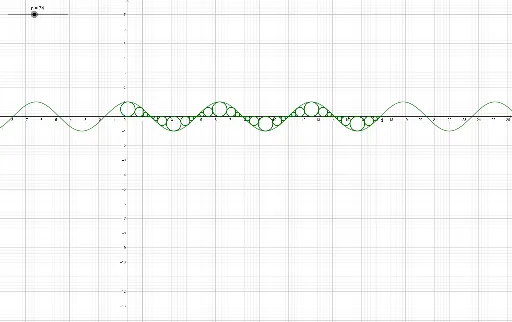
This example demonstrates how to construct complex geometric figures and mathematical objects using GeoGebra. The core math concepts involved include sequences, solid geometry, linear programming, parametric equations, and trigonometry. Key construction points involve commands like CurveCartesian, Join, Sort, Circle, Sequence, and objects such as a, f, g, M_n, b, T_n, N, n, O_{1} to O_{7}, Numel, modulo13, L, PIE, shift, c, d, l1, l2. Suitable for high school and above mathematics learning and exploration.
GeoGebra Commands & Parameters
CurveCartesian(M_n(t) + t, (-1 / f'(t) * M_n(t)) + f(t), t, 0, π / 2) → bJoin({{0, 0, 0, 0, 0, 0, 0}, Sequence[Element[L, modulo13(t)], t, 1, n]}) → PIESort(Join[{Sequence[g(t), t, 1, n], Sequence[g(t), t, 1, n], Sequence[g(t), t, 1, n], Sequence[g(t), t, 1, n], Sequence[g(t), t, 1, n], Sequence[g(t), t, 1, n], Sequence[floor(n / 2)], {0, 0, 0, 0, 0, 0, 0}}]) → shiftCircle(((Element[shift, n] * π) + (((-1)^(Element[PIE, n]), 0) * Element[O_n, Element[Numel, modulo13(n)]]), (Element[O_n, Element[Numel, modulo13(n)]] * (0, (-1)^(Element[shift, n])))), (Element[O_n, Element[Numel, modulo13(n)]] * (0, 1))) → cCircle(((Element[shift, n] * π) + (((-1)^(Element[PIE, n]), 0) * Element[O_n, Element[Numel, modulo13(n)]]), (Element[O_n, Element[Numel, modulo13(n)]] * (0, (-1)^(Element[shift, n])))), (Element[O_n, Element[Numel, modulo13(n)]] * (0, 1))) → dSequence(Circle[O_n(t), (O_n(t) * (0, 1))], t, 1, n) → l1Sequence(Circle[((Element[shift, t] * π) + (((-1)^(Element[PIE, t]), 0) * Element[O_n, Element[Numel, modulo13(t)]]), (Element[O_n, Element[Numel, modulo13(t)]] * (0, (-1)^(Element[shift, t])))), (Element[O_n, Element[Numel, modulo13(t)]] * (0, 1))], t, 1, n) → l2