
Rugby Shape and Its Perimeter by spkwan (2)
Loading the math board and drawing, please wait…
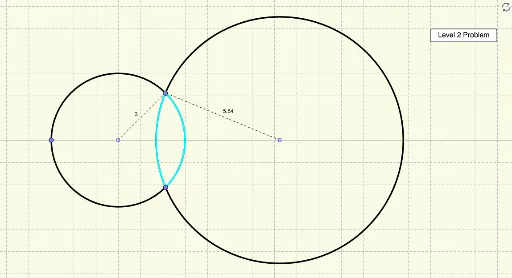
This example demonstrates the rugby shape and its perimeter calculation. Key mathematical concepts include circle, perimeter, and geometric construction. Using GeoGebra commands such as Point, Circle, Intersect, Rotate, etc., the rugby shape is constructed and its perimeter is calculated. Suitable for middle school and above students to learn geometry and perimeter calculation.
GeoGebra Commands & Parameters
Point(a) → APoint(a) → BCircle(A, B) → cIntersect(c, a, 2) → CRotate(C, angC°, A) → C'Rotate(A, (180 - angC - angD)°, C') → A'Ray(C', A') → bIntersect(a, b) → FDistance(C', F) → C'FAngle(C, A, C') → αRotate(C, ((-angC))°, A) → C'_1Angle(C, A, C'_1) → βCircle(D, E) → dRotate(E, angD°, D) → E'Angle(E, D, E') → γRotate(E, ((-angD))°, D) → E'_1Angle(E, D, E'_1) → δAngle(A, C', A') → εPoint(c) → HRotate(H, ((2 * angC))°, A) → H'Angle(H, A, H') → ζCircleArc(A, H, H') → ePoint(d) → IRotate(I, ((2 * angD))°, D) → I'Angle(I, D, I') → ηCircleArc(D, I, I') → fSegment(A, C') → gSegment(A, C'_1) → hAngle(C'_1, A, C') → θSegment(D, C') → j
AI Drawing Prompt Reference
Draw a shape resembling a rugby ball composed of two arcs and two line segments. Start by creating a circle and finding its two intersection points with a line. Rotate one intersection point around the other to get a new point, then draw a ray from the new point to the original point. Find the second intersection point of the ray with the circle and calculate the distance from this point to the new point. Next, draw circles centered at the two intersection points and rotate a point on one of the circles to get a new point. Finally, connect the appropriate points with line segments and use arcs to connect the endpoints of the segments, forming the rugby ball shape.
The prompt above was compiled from the original drawing commands and is for reference only.