
Rubber Band Stretcher - Dilations
Loading the math board and drawing, please wait…
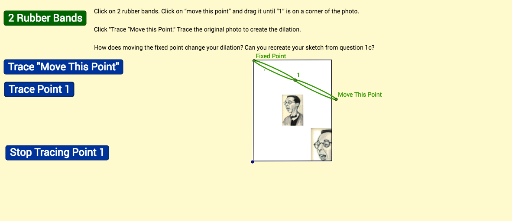
This example demonstrates how a rubber band stretcher achieves the effect of enlarging a figure. Key mathematical concepts include similar transformations and proportional relationships. Using GeoGebra commands such as Segment, Circle, and Intersect, the shape of the rubber band and the stretching process are constructed. Suitable for high school geometry and calculus courses.
GeoGebra Commands & Parameters
Segment(A, B) → aCircle(A, a / 2) → cIntersect(c, a, 1) → CMidpoint(A, C) → DMidpoint(C, B) → EPoint(a) → FCircle(C, F) → dIntersect(d, a, 2) → GCircle(D, F) → eCircle(E, G) → fIntersect(e, a, 2) → HCircle(A, H) → gIntersect(f, a, 2) → ICircle(B, I) → hEllipse(H, F, C) → kEllipse(G, I, B) → pPoint(a) → JCircle(D, J) → qMidpoint(A, D) → KMidpoint(D, C) → LMidpoint(C, E) → MMidpoint(E, B) → NCircle(K, J) → rIntersect(r, a, 2) → OCircle(A, O) → sIntersect(q, a, 2) → PCircle(L, P) → tIntersect(t, a, 2) → QCircle(C, Q) → c_1Intersect(c_1, a, 2) → RCircle(M, R) → d_1Intersect(d_1, a, 2) → SCircle(E, S) → e_1Intersect(e_1, a, 2) → TCircle(N, T) → f_1Intersect(f_1, a, 2) → UCircle(B, U) → g_1Ellipse(O, J, D) → h_1Ellipse(P, Q, C) → k_1Ellipse(R, S, E) → p_1Ellipse(T, U, B) → q_1Circle(A, a / 3) → r_1Circle(A, (2 * a / 3)) → s_1Intersect(r_1, a, 1) → VIntersect(s_1, a, 1) → WMidpoint(A, V) → ZMidpoint(V, W) → A_1Midpoint(W, B) → B_1Point(a) → C_1Circle(V, C_1) → t_1Circle(Z, C_1) → c_2Intersect(c_2, a, 2) → D_1Circle(A, D_1) → d_2Intersect(t_1, a, 2) → E_1Circle(A_1, E_1) → e_2Intersect(e_2, a, 2) → F_1Circle(W, F_1) → f_2Intersect(f_2, a, 2) → G_1Circle(B_1, G_1) → g_2Intersect(g_2, a, 2) → H_1Circle(B, H_1) → h_2Ellipse(D_1, C_1, V) → k_2Ellipse(E_1, F_1, W) → p_2Ellipse(G_1, H_1, B) → q_2Circle(A, a / 5) → r_2Circle(A, (2 * a / 5)) → s_2Circle(A, (3 * a / 5)) → t_2Circle(A, (4 * a / 5)) → c_3Intersect(r_2, a, 1) → I_1Intersect(s_2, a, 1) → J_1Intersect(t_2, a, 1) → K_1Intersect(c_3, a, 1) → L_1Midpoint(A, I_1) → M_1Midpoint(J_1, I_1) → N_1Midpoint(J_1, K_1) → O_1Midpoint(K_1, L_1) → P_1Midpoint(L_1, B) → Q_1Point(a) → R_1Circle(I_1, R_1) → d_3Circle(M_1, R_1) → e_3Intersect(e_3, a, 2) → S_1Circle(A, S_1) → f_3Intersect(d_3, a, 2) → T_1Circle(N_1, T_1) → g_3Intersect(g_3, a, 2) → U_1Circle(J_1, U_1) → h_3Intersect(h_3, a, 2) → V_1Circle(O_1, V_1) → k_3Intersect(k_3, a, 2) → W_1Circle(K_1, W_1) → p_3Intersect(p_3, a, 2) → Z_1Circle(P_1, Z_1) → q_3Intersect(q_3, a, 2) → A_2Circle(L_1, A_2) → r_3Intersect(r_3, a, 2) → B_2Circle(Q_1, B_2) → s_3Intersect(s_3, a, 2) → C_2Circle(B, C_2) → t_3Ellipse(S_1, R_1, I_1) → c_4Ellipse(T_1, U_1, J_1) → d_4Ellipse(V_1, W_1, K_1) → e_4Ellipse(Z_1, A_2, L_1) → f_4Ellipse(B_2, C_2, B) → g_4
AI Drawing Prompt Reference
Draw a rubber band stretcher by first drawing a line segment AB, then drawing a circle with center A and radius half of AB, and finding the intersection point C. Next, find the midpoints D and E of line segments AC and CB, respectively, and draw a circle with center C and radius CF, finding the intersection point G. Continue by drawing circles DE, EF, FG, GH, HI, and IB, then draw ellipses HC, GB, GE, FB, FA, and FB. Finally, draw circles AD, BE, CF, DG, EH, FI, GH, HI, IJ, JK, KL, LM, MN, NO, OP, PQ, PR, QR, RS, ST, TU, UV, VW, WX, XY, YZ, ZA_1, and B_1, ensuring all circles and ellipses intersect with line segment AB.
The prompt above was compiled from the original drawing commands and is for reference only.