
Rotations Page 1: Exploring Polygon Rotation and Intersections
Loading the math board and drawing, please wait…
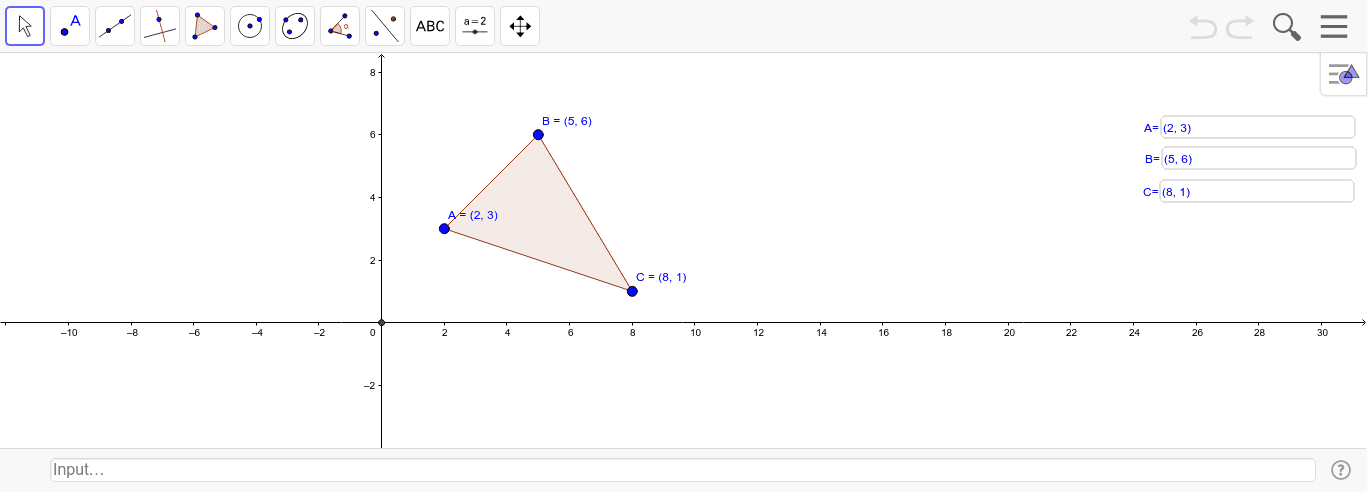
① This GeoGebra example demonstrates the dynamic rotation of a polygon around a point, showing how its sides intersect with the original figure as the rotation angle changes. ② Core mathematical concepts include planar rotation transformation, polygon properties, and intersection of geometric objects, emphasizing the effect of rotation angle on position. ③ Construction highlights: uses the Polygon command to create polygon poly1 with vertices A, B, C; employs Textfield to create three input boxes (InputBox1, InputBox2, InputBox3) for entering rotation parameters; applies the Intersect command to compute intersection point D between the rotated and original figures, enabling interactive exploration. ④ Suitable for middle and high school students learning geometric transformations, and for teachers demonstrating rotation concepts in class, helping students understand rotation center, angle, and corresponding points.
GeoGebra Commands & Parameters
Polygon(A, B, C) → poly1, c, a, bTextfield(A) → InputBox1Textfield(B) → InputBox2Textfield(C) → InputBox3Intersect(xAxis, yAxis) → D
AI Drawing Prompt Reference
Draw a triangle and rotate it around an external point, showing how its sides intersect with the original triangle as the rotation angle changes. Include three input boxes for adjusting rotation parameters, and a reference point at the intersection of the coordinate axes. Emphasize the effect of rotation angle on the figure's position and intersections, suitable for teaching geometric transformations.
The prompt above was compiled from the original drawing commands and is for reference only.