
Rotations in the Coordinate Plane by Brooke Becker
Loading the math board and drawing, please wait…
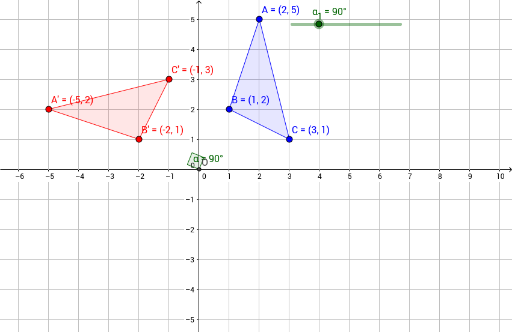
This example demonstrates the process of rotating a triangle in the coordinate plane. It involves core mathematical concepts such as rotation, vectors, coordinate geometry, angles, and geometric transformations. Key GeoGebra commands and objects used include Intersect, Rotate, Polygon, Angle, and elements like A, B, C, O, α_1, A', B', C', poly1', c, a, b, poly1, c, a, b, α. It is suitable for high school students learning about the properties of rotational transformations and their coordinate representations, as well as for geometric construction teaching.
GeoGebra Commands & Parameters
Intersect(xAxis, yAxis) → ORotate(A, α_1, O) → A'Rotate(B, α_1, O) → B'Rotate(C, α_1, O) → C'Polygon(A', B', C') → poly1', c', a', b'Polygon(A, B, C) → poly1, c, a, bAngle(A, O, A') → α
AI Drawing Prompt Reference
Draw a coordinate plane with two perpendicular axes intersecting at a central point. Place three non-collinear points to form a triangle. Then, rotate this triangle around the central point by a certain angle, creating a second triangle. Show the rotation angle as an angle at the center between the lines to a corresponding vertex of the original and rotated triangles. Use distinct colors or line styles for the original triangle, the rotated triangle, and the angle arc. Keep the axes and grid visible to illustrate the transformation clearly.
The prompt above was compiled from the original drawing commands and is for reference only.