
Rotations and Equilateral Triangles: Geometric Construction via Matrix Transform
Loading the math board and drawing, please wait…
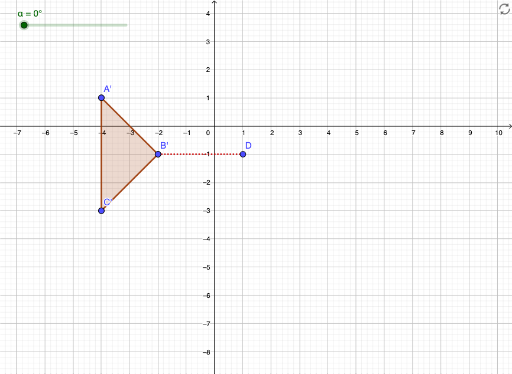
① This GeoGebra example demonstrates rotating polygons (e.g., triangles) around a point by a specified angle, showing the original and rotated figures with corresponding sides and angles, while incorporating equilateral triangles and matrix concepts. ② Core mathematical concepts include rotation transformations, properties of equilateral triangles, matrix representation of transformations, quadrilaterals and volume (possibly involving 3D rotation or solid extensions), function graphs, and angle measurement. ③ Construction highlights: from the summary, commands such as Polygon, Rotate, Segment, and Angle are used, creating objects like α (angle), A, B, C (vertices), t1 (triangle), c, a, b (sides or auxiliary lines), D (point), rotated images A', B', C', t1', c', a', b', plus f, g (possibly functions or loci), and β (another angle). The rotation angle can be controlled via slider or input, allowing dynamic comparison between preimage and image. ④ Suitable for middle/high school geometry, introductory linear algebra, or math lab sessions, to understand the geometric meaning of rotations, their matrix representation, and dynamic visual changes.
GeoGebra Commands & Parameters
Polygon(A, B, C) → t1, c, a, bRotate(A, α, D) → A'Rotate(B, α, D) → B'Rotate(C, α, D) → C'Polygon(A', B', C') → t1', c', a', b'Segment(B, D) → fSegment(B', D) → gAngle(B, D, B') → β