
Rotations Activity Intervention: Exploring Triangle Rotation and Similarity
Loading the math board and drawing, please wait…
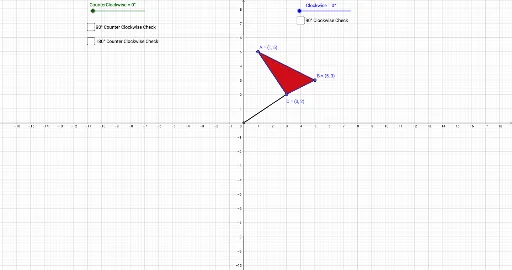
① This GeoGebra example dynamically demonstrates the rotation of a triangle around a point (both counterclockwise and clockwise), producing new triangles and illustrating the relationships between original and rotated figures, corresponding sides, and angles. ② Core mathematical concepts include rotation transformation, rotation angle, similar triangles, linear regression (used to analyze linear relationships between coordinates of corresponding points after rotation), multiplication and LCM/GCD (possibly for exploring numerical patterns), and bar charts (for data visualization). ③ Construction highlights: Polygon is used to construct the original triangle, Intersect finds intersection points, Rotate generates rotated triangles (labeled CounterClockwise and Clockwise), Segment connects corresponding points, and Angle measures rotation angles; objects include A, B, C, t1, c, a, b, CounterClockwise, D, A', B', C', t1', c', a', b', Clockwise, Angle, A'', B'', C'', t1'_1, c'_1, a'_1, b'_1, f, g, h, δ, γ, text1, d, text2, e, text3, i. ④ Suitable for middle school to high school students learning geometric transformations, and for teachers to demonstrate rotation properties and similar triangle criteria in class, or as a math lab activity.
GeoGebra Commands & Parameters
Polygon(A, B, C) → t1, c, a, bIntersect(xAxis, yAxis) → DRotate(A, CounterClockwise, D) → A'Rotate(B, CounterClockwise, D) → B'Rotate(C, CounterClockwise, D) → C'Polygon(A', B', C') → t1', c', a', b'Rotate(A, (-((Angle * Clockwise))), D) → A''Rotate(B, (-((Angle * Clockwise))), D) → B''Rotate(C, (-((Angle * Clockwise))), D) → C''Polygon(A'', B'', C'') → t1'_1, c'_1, a'_1, b'_1Segment(D, C) → fSegment(D, C'') → gSegment(D, C') → hAngle(C'', D, C) → δAngle(C, D, C') → γ
AI Drawing Prompt Reference
Draw a triangle with a rotation center at one of its vertices. Use a slider to control the rotation angle, generating two new triangles rotated clockwise and counterclockwise. Connect the rotation center to corresponding vertices of all three triangles with segments, and label the rotation angles. Show the relationships between corresponding sides and angles of the original and rotated triangles to illustrate similarity. Include coordinate axes, the rotation center, three triangles, connecting segments, and angle labels, suitable for teaching geometric transformations.
The prompt above was compiled from the original drawing commands and is for reference only.