
Rotation Simulation: Dynamic Transformation of Quadrilateral and Parabola
Loading the math board and drawing, please wait…
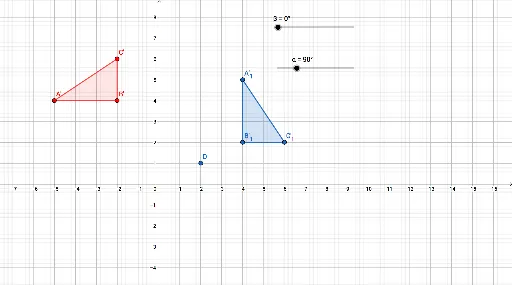
① This GeoGebra example demonstrates the rotation of a general quadrilateral around a point, showing both the original and rotated figures with corresponding sides and angles, making the geometric transformation visually clear. ② Core mathematical concepts include planar rotation transformation, rotation center, rotation angle, correspondence between points and sides, and the property that rotation preserves shape and size; the construction also involves polygons and a parabola, potentially linking to function graphs and basic integral concepts. ③ Construction highlights: using the Polygon command to create the original quadrilateral, the Rotate command to generate rotated copies, and sliders α and β to control rotation angles; objects include A, B, C, D, t1, c, a, b, and rotated counterparts A', B', C', t2, c', a', b', β, plus a second rotation set (A'_1, B'_1, C'_1, t3, c'_1, a'_1, b'_1) to simulate continuous rotation animation. ④ Suitable for middle/high school geometry classes to dynamically explore rotation properties, and for college-level analytic geometry or computer-assisted math labs to connect transformations with algebraic representations.
GeoGebra Commands & Parameters
Polygon(A, B, C) → t1, c, a, bRotate(A, α, (0, 0)) → A'Rotate(B, α, (0, 0)) → B'Rotate(C, α, (0, 0)) → C'Polygon(A', B', C') → t2, c', a', b'Rotate(A, β, (0, 0)) → A'_1Rotate(B, β, (0, 0)) → B'_1Rotate(C, β, (0, 0)) → C'_1Polygon(A'_1, B'_1, C'_1) → t3, c'_1, a'_1, b'_1