
Rotation of a Polygon around the Origin
Loading the math board and drawing, please wait…
In collections
rotations
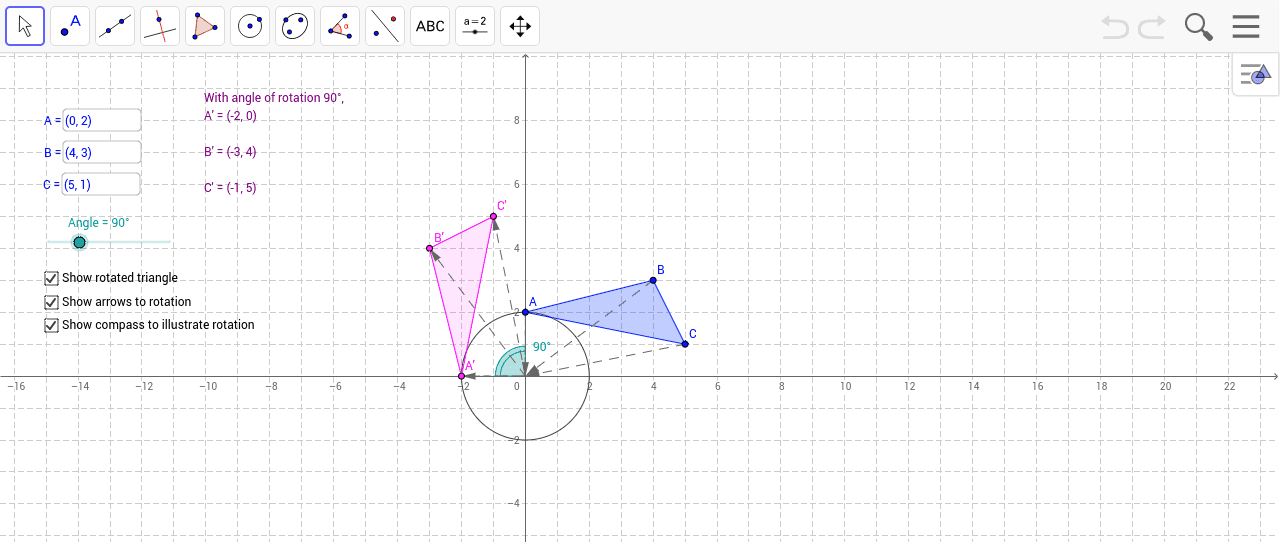
This GeoGebra worksheet demonstrates the rotation of a polygon around the origin. Users can drag vertices A, B, and C to reshape the figure, and use the angle slider α to dynamically adjust the rotation angle from 0° to 360°, observing how the original shape maps to its rotated position in real time. Core mathematical concepts include: geometric transformation, rotation mapping in the coordinate plane, angle measurement, and vector representation. Construction details: Based on the command summary, this example uses the Polygon command to construct the initial polygon, the Rotate command to perform the transformation, Vector commands to display transformation vectors, Angle commands to label angles, and Segment commands to connect key points. Interactive input boxes (inputBoxA/B/C) allow users to enter precise coordinate values. This interactive tool is ideal for teaching rotation properties, coordinate relationships with trigonometric functions, and transformation matrices in secondary school mathematics, helping students intuitively understand the rotation formula (x',y')=(xcosα-ysinα, xsinα+ycosα).
GeoGebra Commands & Parameters
Polygon(A, B, C) → poly1_1, c_1, a_1, b_1Textfield(B) → inputBoxBTextfield(A) → inputBoxATextfield(C) → inputBoxCRotate(B, Angle, O) → B'Rotate(C, Angle, O) → C'Rotate(A, Angle, O) → A'Polygon(A', B', C') → poly1, c', a', b'Vector(A, O) → u_1Vector(O, A') → u_2Vector(B, O) → v_1Vector(O, B') → v_2Vector(C, O) → w_1Vector(O, C') → w_2Angle(A, O, A') → αCircle(O, Segment[A, O]) → cSegment(A, O) → com_1Segment(O, A') → com_2
AI Drawing Prompt Reference
Draw a triangle with three vertices, one at the origin and the other two draggable. Add a slider for rotation angle from 0 to 360 degrees, rotating the triangle about the origin. Show the rotated triangle in a different color, with arrows from each original vertex to the origin and then to the rotated vertex, illustrating the rotation path. Label the rotation angle at the origin, and draw a circle centered at the origin passing through one original vertex to aid visualization.
The prompt above was compiled from the original drawing commands and is for reference only.