
Rotation Demo
Loading the math board and drawing, please wait…
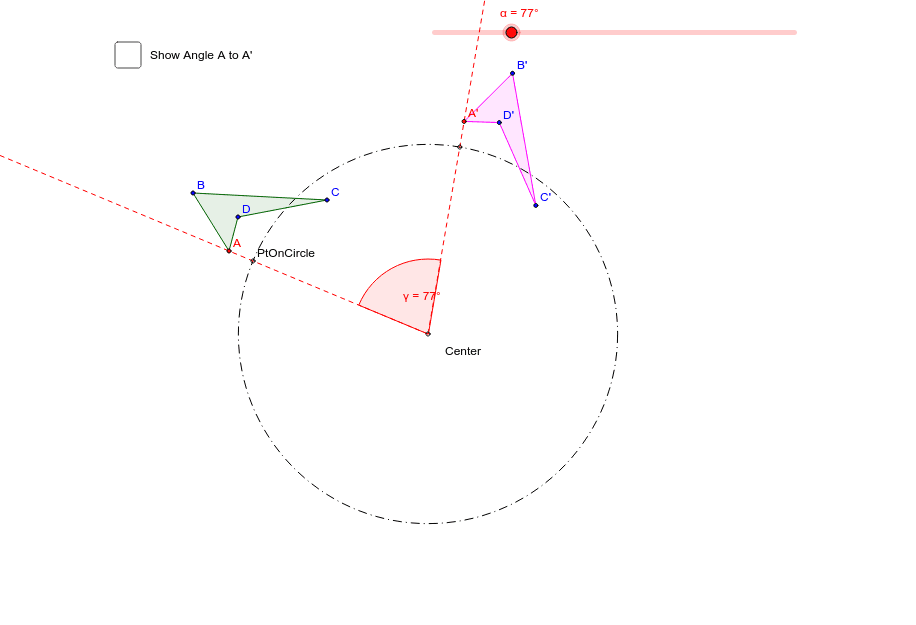
This example demonstrates the dynamic process and properties of geometric rotations. It involves core math concepts like rotation, angle measurement, and polygon construction. The construction uses commands such as Polygon, Circle, Rotate, Segment, Angle, Ray to create the rotation center, polygon, and rotated figures. Suitable for middle school students and teachers for instructional demonstration and concept understanding.
GeoGebra Commands & Parameters
Polygon(A, B, C, D) → poly1, a, b, c, dCircle(Center, PtOnCircle) → eRotate(A, (-α), Center) → A'Rotate(B, (-α), Center) → B'Rotate(C, (-α), Center) → C'Rotate(D, (-α), Center) → D'Polygon(A', B', C', D') → poly1', a', b', c', d'Segment(Center, A) → fSegment(Center, A') → gAngle(A', Center, A) → βSegment(PtOnCircle, Center) → hRotate(PtOnCircle, (-α), Center) → PtOnCircle'Angle(PtOnCircle', Center, PtOnCircle) → γRay(Center, PtOnCircle) → iRay(Center, PtOnCircle') → j