
Rotating Regular Polygons: Dynamic Geometry and Optimization
Loading the math board and drawing, please wait…
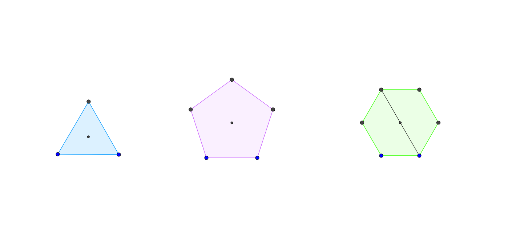
This GeoGebra example demonstrates the dynamic geometric phenomena of rotating regular polygons, where multiple polygons are rotated and their vertices, sides, and intersection points are observed to explore changes in perimeter, area, and other geometric quantities. Core mathematical concepts include properties of regular polygons, rotation transformations, segment and angle bisectors, optimization of polygon perimeter and area, and extensions to 3D vectors. Construction highlights: using GeoGebra commands such as Polygon to create multiple regular polygons (poly1, poly2, poly3), Segment, Intersect, LineBisector, and AngularBisector to construct auxiliary lines, intersection points, and angle bisectors, with sliders or dynamic parameters controlling rotation angles to generate animated figures. This example is suitable for upper secondary and early university students, aiding in understanding geometric transformations, optimization problems, and dynamic geometry exploration, and can serve as material for math labs or competition training.
GeoGebra Commands & Parameters
Polygon(A, B, 6) → poly1, f, F, g, h, i, j, k, C, D, ESegment(D, A) → lSegment(E, B) → mIntersect(l, m) → GPolygon(H, I, 3) → poly2, n, p, q, JPolygon(K, L, 5) → poly3, r, s, t, a, b, M, N, OLineBisector(n) → cLineBisector(p) → dIntersect(c, d) → PAngularBisector(a, t) → e, f_1AngularBisector(s, r) → g_1, h_1Intersect(f_1, h_1) → Q
AI Drawing Prompt Reference
Create a dynamic geometry scene: first construct a regular hexagon, connect two opposite vertices with segments to form diagonals, and mark their intersection. Then, using two other points, construct an equilateral triangle, and with two more points, construct a regular pentagon. For the triangle, draw perpendicular bisectors of two of its sides and mark their intersection. For the pentagon, draw angle bisectors of two adjacent angles and mark the intersection of two of these bisectors. All polygons can rotate about a point, with a slider controlling the rotation angle, to observe how vertices, sides, and intersection points change.
The prompt above was compiled from the original drawing commands and is for reference only.