
Rotating Circle Animation
Loading the math board and drawing, please wait…
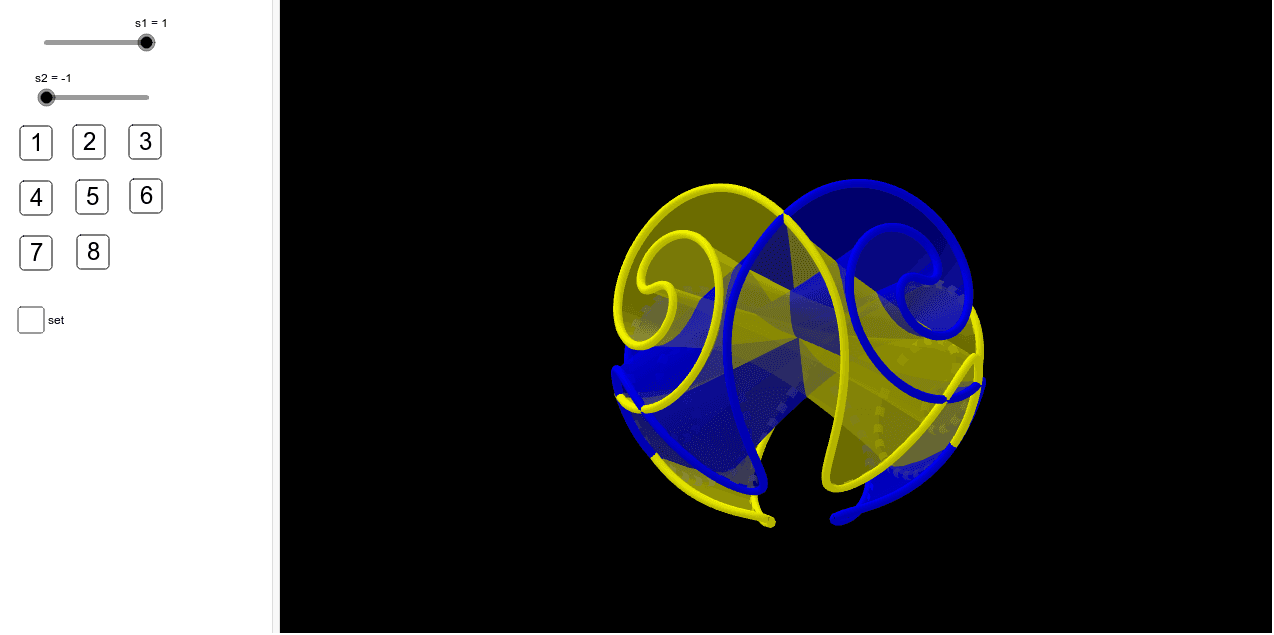
①This example demonstrates a circle rotating around its center or an arbitrary point, producing a trajectory or a rotated surface. ②The core mathematical concepts involved include rotation transformation, parametric equations, derivatives (such as rotation speed), polygon approximation, and ellipse parameter representation. ③The GeoGebra construction uses the CurveCartesian command to generate parametric curves and Surface objects to build rotated surfaces; key objects include sliders a, b, s1, s2 and buttons Bouton1‑Bouton8 that control rotation angle and parameter changes. ④It is suitable for high‑school and above students studying spatial geometry, analytic geometry, and calculus transformations and parameterizations, as well as for teaching demonstrations and interactive experiments.
GeoGebra Commands & Parameters
CurveCartesian((cos(t) * cos(g(t))), sin(t), (cos(t) * sin(g(t))), t, (-π), π) → hSurface(((cos(t) * cos(g(t))) * (1 - v)) + ((v * cos((-t))) * cos(g((-t)))), (sin(t) * (1 - (2 * v))), ((cos(t) * sin(g(t))) * (1 - v)) + ((v * cos((-t))) * sin(g((-t)))), t, 0, π, v, 0, 1) → iSurface((sin(t) * (1 - (2 * v))), ((cos(t) * cos(g(t))) * (1 - v)) + ((v * cos((-t))) * cos(g((-t)))), ((cos(t) * sin(g(t))) * (1 - v)) + ((v * cos((-t))) * sin(g((-t)))), t, 0, π, v, 0, 1) → jCurveCartesian(sin(t), (cos(t) * cos(g(t))), (cos(t) * sin(g(t))), t, (-π), π) → c
AI Drawing Prompt Reference
Create a 3D animation of a rotating circle: start with a unit circle defined by a parametric equation, then apply a rotation angle function g(t) to spin the circle around its center or an arbitrary point, producing two space curves lying in the xz‑ and yz‑planes. Next build two parametric surfaces that interpolate between each curve and its reversed‑rotation copy using a parameter v from 0 to 1, yielding a twisted torus‑like shape. Include sliders for the rotation angles a and b and for parameters s1 and s2, plus buttons to start or pause the animation, showing the evolving trajectory and rotated surface in real time.
The prompt above was compiled from the original drawing commands and is for reference only.