
Rotating 180 Degrees About the Origin
Loading the math board and drawing, please wait…
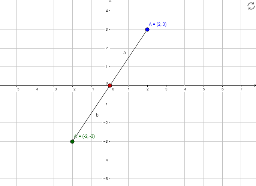
This example demonstrates rotating points A and B by 180 degrees about the origin to obtain their images A' and B', then connecting them to form a segment, visually illustrating the effect of central symmetry. The core mathematical concept is rotation transformation in plane geometry, specifically a 180-degree rotation about the origin, which corresponds to negating both coordinates of each point. Construction steps: use the GeoGebra Rotate command on points A and B, then use the Segment command to connect the rotated points A' and B', producing the transformed segment. Suitable for middle or high school students learning geometric transformations and coordinate symmetry, as well as for teachers demonstrating the intuitive properties of rotation in class.
GeoGebra Commands & Parameters
Rotate(A, 180°, B) → A'Segment(A, B) → aSegment(A', B) → b