
Rigid Transformations: Working with Transformations
Loading the math board and drawing, please wait…
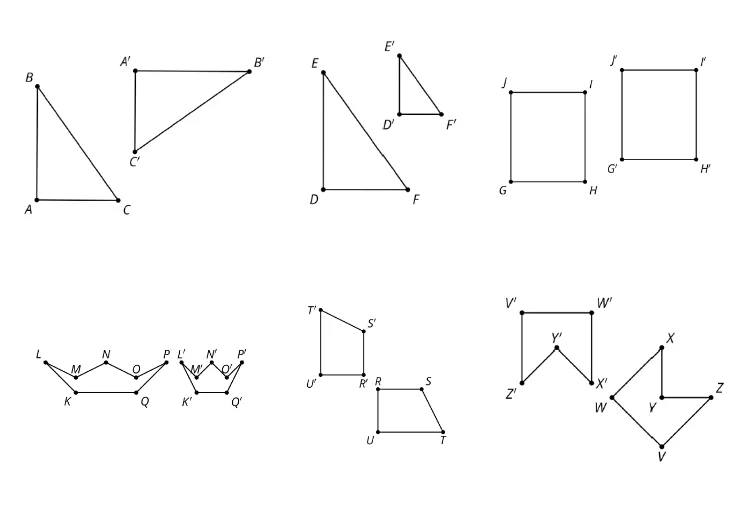
This example demonstrates the concept of rigid transformations, including translation, rotation, and reflection. Key mathematical concepts include the properties of geometric transformations. Using GeoGebra commands such as points A, B, C, etc., the transformed figures are constructed. Suitable for middle school and above students learning geometric transformations.
GeoGebra Commands & Parameters
Point A(-4.223140495867769, 3.0909090909090913)Point B(0.7768595041322317, 3.0909090909090913)Point C(2.322314049586777, 2.024793388429752)Point D(7.266314049586777, 2.020793388429752)Point E(7.8264462809917354, 2.5454545454545454)Point F(13.826446280991735, 2.5454545454545454)Point G(-4.421487603305787, -3.0330578512396684)Point H(1.5785123966942152, -3.0330578512396684)Point I(2.8099173553719003, -4.024793388429751)Point J(6.8099173553719, -4.024793388429751)Point K(8.049586776859504, -4.619834710743801)Point L(14.049586776859504, -4.619834710743801)Point M(-4.996821938392187, 1.9925694966190837)Point N(1.9752066115702478, 1.9504132231404956)
AI Drawing Prompt Reference
On a coordinate plane, place the given points at their specified coordinates to form several connected polyline segments. Connect A to B, then to C, then from C to D, from D to E, and from E to F. Also connect G to H, then H to I, I to J, J to K, and K to L to form another polyline. Finally place M and connect it to N with a segment. The point layout should illustrate rigid-transformation relationships through translation/rotation/reflection-like positioning.
The prompt above was compiled from the original drawing commands and is for reference only.