
Right Triangles - Pythagorean Theorem
Loading the math board and drawing, please wait…
In collections
Geo&Alg:Area Volume Pythagorean Th.
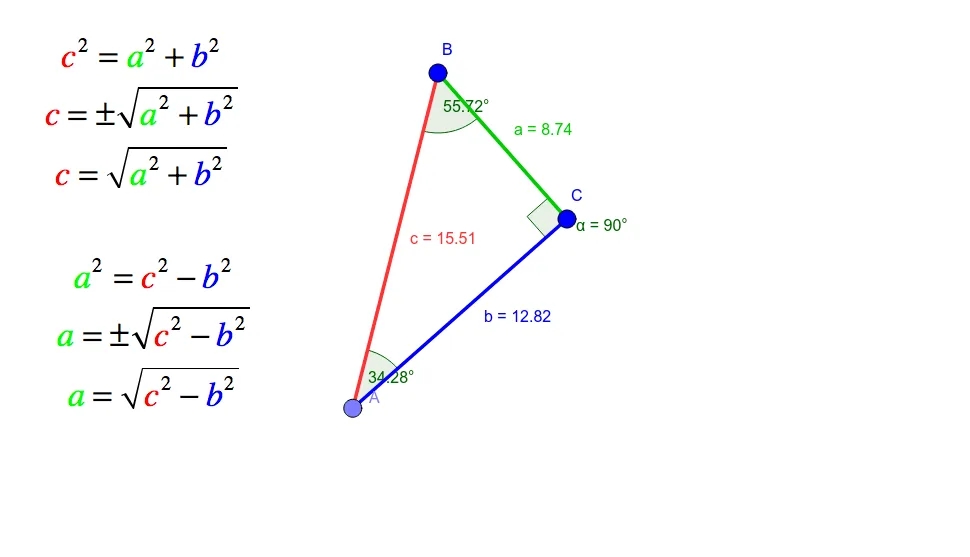
This example demonstrates right triangles and the Pythagorean theorem, which states that in a right triangle, the square of the length of the hypotenuse (the side opposite the right angle) is equal to the sum of the squares of the lengths of the other two sides. Using the commands in the construction summary, we can see how to create a right triangle in GeoGebra and verify the theorem by adjusting angles and side lengths. Suitable for middle and high school students studying geometry and trigonometry.
GeoGebra Commands & Parameters
Segment(C, B) → aOrthogonalLine(C, a) → b_1Point(b_1) → ASegment(A, B) → cSegment(C, A) → bAngle(B, C, A) → αAngle(C, A, B) → βAngle(A, B, C) → γ
AI Drawing Prompt Reference
Draw a right triangle with one leg as segment CB, the hypotenuse as segment CA, and the other leg as segment AB. Adjust the angles and side lengths to verify the Pythagorean theorem: the square of the hypotenuse equals the sum of the squares of the other two sides.
The prompt above was compiled from the original drawing commands and is for reference only.