
Right Triangle Trig Ratios
Loading the math board and drawing, please wait…
In collections
Geometry - Mini Similarity Book
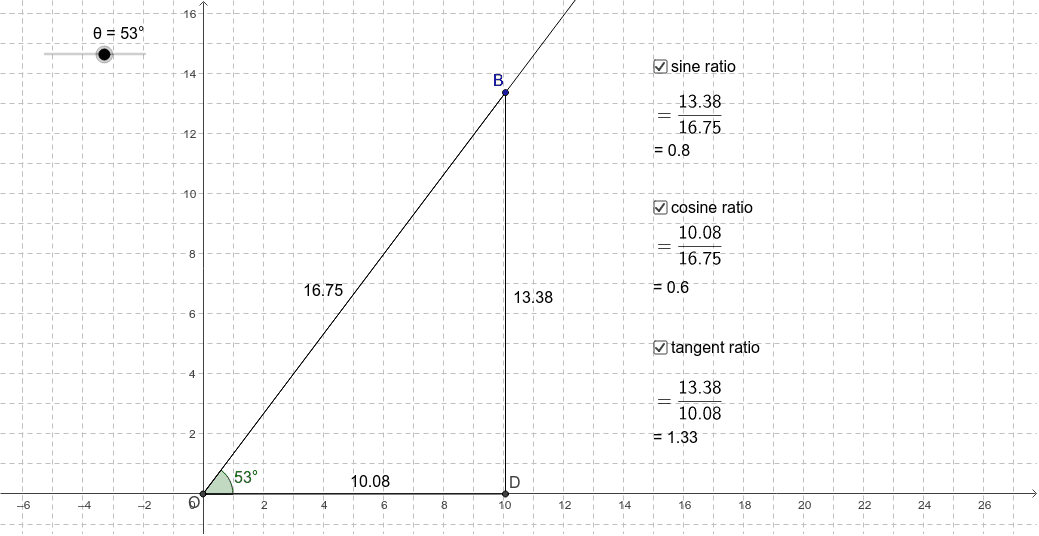
This example demonstrates how trigonometric ratios change as the angle and triangle size vary. Key mathematical concepts include trigonometric functions (sine, cosine, tangent). Using GeoGebra commands such as Point, Intersect, Rotate, etc., it dynamically illustrates the geometric meaning of trigonometric functions. Suitable for middle school and above students to learn basic concepts of trigonometric functions.
GeoGebra Commands & Parameters
Point(xAxis) → AIntersect(xAxis, yAxis) → ORotate(A, θ, O) → CAngle(A, O, C) → βRay(O, C) → aPoint(a) → BOrthogonalLine(B, xAxis) → bIntersect(b, xAxis) → DSegment(B, D) → cSegment(O, D) → dSegment(O, B) → e
AI Drawing Prompt Reference
Draw a right triangle with the right angle at point O on the origin. Place point A on the x-axis, rotate A to get point C forming angle β. Draw a ray a from C intersecting the x-axis at point B. Draw a line b perpendicular to the x-axis from B intersecting the x-axis at point D. Connect B and D to form side c, connect O and D to form side d, and connect O and B to form side e.
The prompt above was compiled from the original drawing commands and is for reference only.