
Right Pyramid
Loading the math board and drawing, please wait…
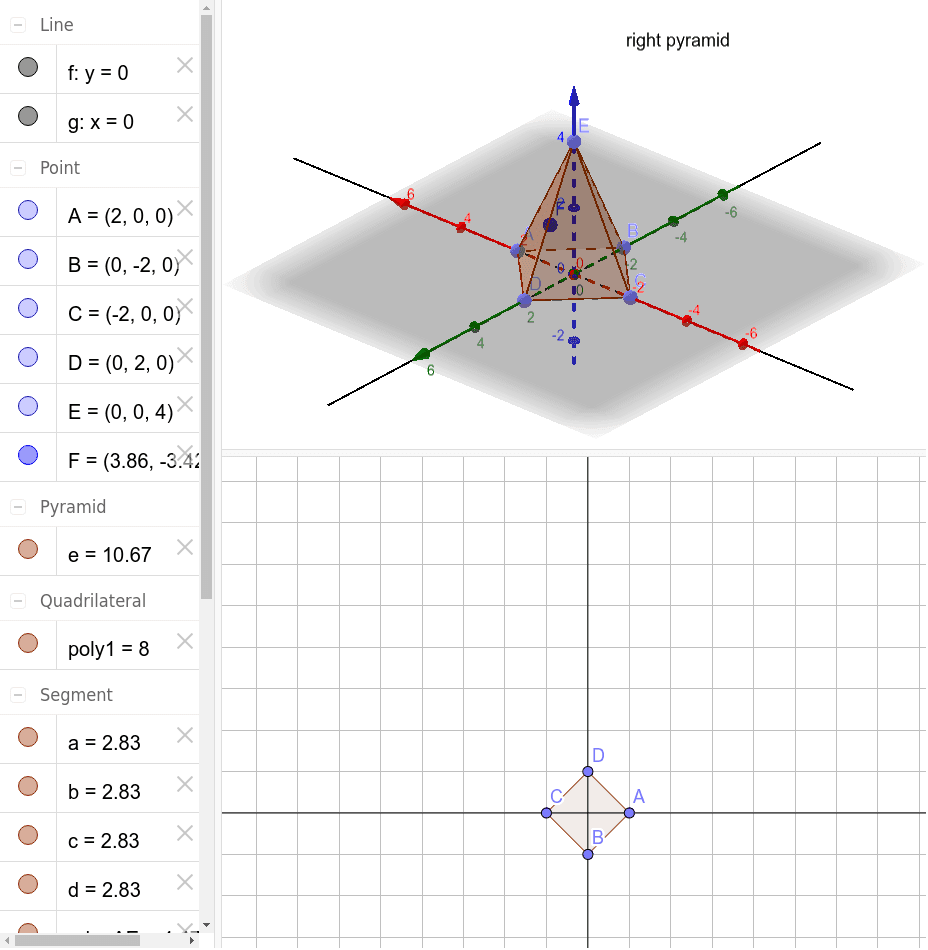
This example demonstrates the construction of a right pyramid. Key mathematical concepts include the definition and properties of a pyramid in solid geometry. Using GeoGebra commands such as Point, Polygon, Line, and Pyramid, the various faces and edges of the pyramid can be constructed. Suitable for high school mathematics education and students learning solid geometry.
GeoGebra Commands & Parameters
Point(xAxis) → APoint(yAxis) → BPoint(xAxis) → CPoint(yAxis) → DPolygon(A, B, C, D) → poly1, a, b, c, dLine(A, C) → fLine(B, D) → gPoint(zAxis) → EPyramid(poly1, E) → e, faceABE, faceBCE, faceCDE, faceADE, edgeAE, edgeBE, edgeCE, edgeDE
AI Drawing Prompt Reference
Draw a right pyramid with a square base ABCD on the coordinate axes, where A is at (0,0), B at (0,1), C at (1,0), and D at (1,1), and the apex E at (0,0,1). First, draw the square base ABCD, then draw the diagonals AC and BD, and finally connect the apex E to each vertex of the base A, B, C, and D to form the five faces and eight edges of the pyramid.
The prompt above was compiled from the original drawing commands and is for reference only.