
Right Hand Rule Magnetic Force Cross Product Visualization
Loading the math board and drawing, please wait…
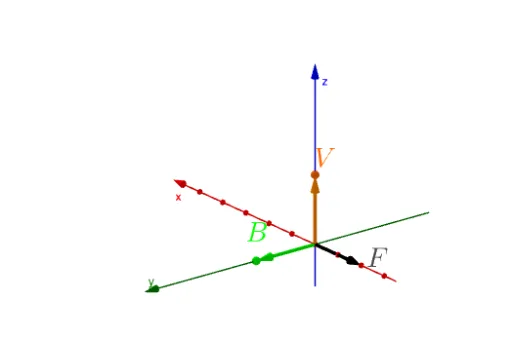
This example visualizes the right hand rule for magnetic force cross product using 3D vectors. It demonstrates the cross product operation and its application in physics. Commands like UnitVector, Textfield, and Polygon are used to construct vectors and graphics. Suitable for high school physics and mathematics education.
GeoGebra Commands & Parameters
UnitVector(Vector[B]) → BvectorUnitVector(Vector[V]) → VvectorUnitVector(Vector[Vvector ⊗ Bvector]) → F1Textfield(vi) → InputBox1Textfield(vj) → InputBox2Textfield(vk) → InputBox3Textfield(Bi) → InputBox4Textfield(Bj) → InputBox5Textfield(Bk) → InputBox6Polygon((0, 0, 0), Vvectorpoint, Bvectorpoint) → H, f, g, h
AI Drawing Prompt Reference
Create a visualization of the right hand rule for magnetic force cross product. First, input two 3D vectors V and B representing the current direction and magnetic field direction. Calculate the unit vectors Vvector and Bvector of V and B, then compute the unit vector F1 of their cross product. Draw a parallelogram with the origin and the endpoints of Vvector and Bvector. Finally, input the components of V and B and display them in text boxes.
The prompt above was compiled from the original drawing commands and is for reference only.