
Right and Oblique Cylinders
Loading the math board and drawing, please wait…
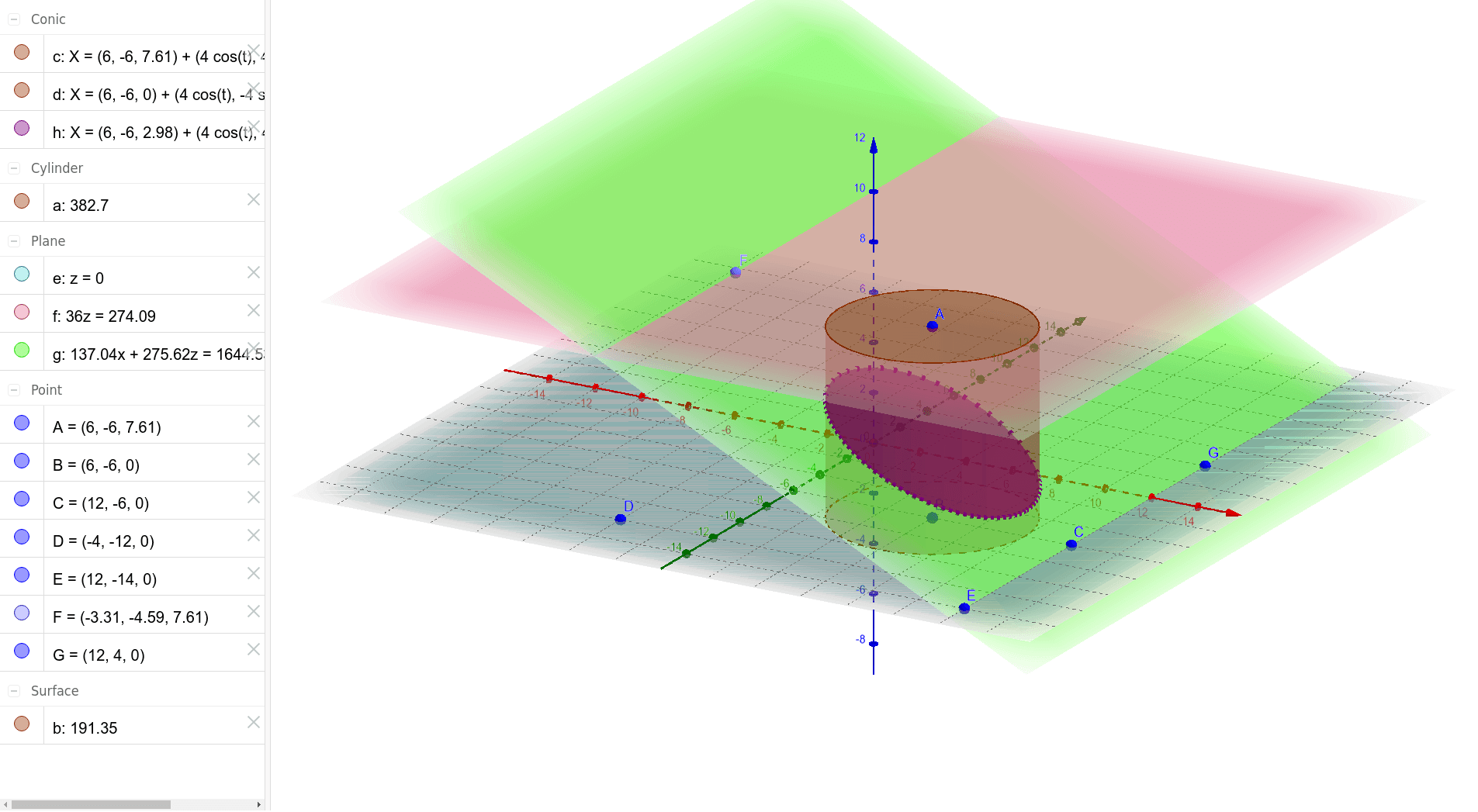
This example illustrates the construction of right and oblique cylinders. Key mathematical concepts include the classification of cylinders in solid geometry. Using GeoGebra commands such as Cylinder, Plane, and PointIn, the generation process of the cylinders is visually demonstrated. Suitable for students at the middle school level and above.
GeoGebra Commands & Parameters
Cylinder(A, B, 4) → a, c, d, bPlane(D, B, C) → ePlane(A, e) → fPointIn(f) → FPlane(F, E, G) → gIntersectPath(g, a) → hCorner(h)
AI Drawing Prompt Reference
Draw a right cylinder and an oblique cylinder to illustrate their construction. First, create a cylinder, then form a plane that includes the base of the cylinder. Next, create another plane based on this one. Mark a point on this new plane and use it with two other points to form a new plane. Finally, intersect this new plane with the path of the right cylinder to get an intersection point, highlighting it to show the formation of the oblique cylinder.
The prompt above was compiled from the original drawing commands and is for reference only.