
Richmond Curvature Circle
Loading the math board and drawing, please wait…
In collections
geometriadinamica.es
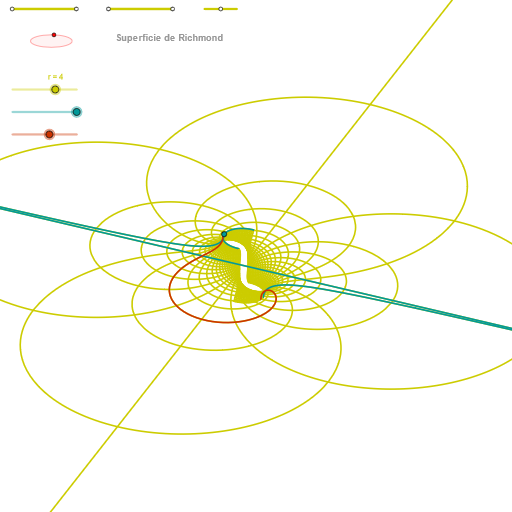
This example demonstrates the construction of the Richmond curvature circle. Key mathematical concepts include circles, ellipses, and angles. Using GeoGebra commands such as Segment, Point, Ellipse, etc., the Richmond curvature circle can be constructed. Suitable for high school mathematics education and learning.
GeoGebra Commands & Parameters
Segment(Q3, Q4) → p2Point(p2) → P3Segment(P3, Q4) → p4Point(p4) → P4Segment(Q1, Q2) → p1Point(p1) → P1Segment(P1, Q2) → p3Point(p3) → P2OrthogonalLine(C, yAxis) → zz1Circle(C, 0.62) → zz0Intersect(zz0, zz1, 1) → ZZ1Intersect(zz0, zz1, 2) → ZZ2Ellipse(ZZ1, ZZ2, 0.65) → zElipse1Intersect(zElipse1, zz1) → ZZ5, ZZ6Point(zElipse1) → XYAngle(ZZ6, C, XY) → zAngRotOrthogonalLine(C, xAxis) → zz2Intersect(zz0, zz2, 2) → ZZ3Intersect(zz0, zz2, 1) → ZZ4Ellipse(ZZ3, ZZ4, 0.65) → zElipse2Intersect(zElipse2, zz2) → ZZ7, ZZ8Point(zElipse2) → ZAngle(ZZ8, C, Z) → zAngIncSegment(Q5, Q6) → p5Point(p5) → P5CurveCartesian(((r / 4 * ((-3 * u) - u^(5)) / ((6 * u^(2)))) * sin(zAngRot)), (r / 4 * (((((3 * u) + u^(5)) / ((6 * u^(2))) * cos(zAngRot)) * sin(zAngInc)) + (u * cos(zAngInc)))), u, u1, u2) → curva1Segment(ZZ5, ZZ6) → zz4Segment(ZZ7, ZZ8) → zz3Intersect(zElipse2, zElipse1, 1) → zPunto1Intersect(zElipse2, zElipse1, 4) → zPunto2Segment(zPunto1, zPunto2) → zSeg2CurveCartesian((r / 4 * ((((-3 * α) - α^(5) + ((2 * α^(3)) * v^(2)) + ((3 * α) * v^(4))) / ((6 * (α^(2) + v^(2)))) * sin(zAngRot)) + (((-3 * v) - ((3 * α^(4)) * v) - ((2 * α^(2)) * v^(3)) + v^(5)) / ((6 * (α^(2) + v^(2)))) * cos(zAngRot)))), (r / 4 * (((((-((-3 * α) - α^(5) + ((2 * α^(3)) * v^(2)) + ((3 * α) * v^(4))))) / ((6 * (α^(2) + v^(2)))) * cos(zAngRot)) * sin(zAngInc)) + ((((-3 * v) - ((3 * α^(4)) * v) - ((2 * α^(2)) * v^(3)) + v^(5)) / ((6 * (α^(2) + v^(2)))) * sin(zAngRot)) * sin(zAngInc)) + (α * cos(zAngInc)))), v, v1, v2) → curva2CurveCartesian((r / 4 * ((((-3 * u) - u^(5) + ((2 * u^(3)) * β^(2)) + ((3 * u) * β^(4))) / ((6 * (u^(2) + β^(2)))) * sin(zAngRot)) + (((-3 * β) - ((3 * u^(4)) * β) - ((2 * u^(2)) * β^(3)) + β^(5)) / ((6 * (u^(2) + β^(2)))) * cos(zAngRot)))), (r / 4 * (((((-((-3 * u) - u^(5) + ((2 * u^(3)) * β^(2)) + ((3 * u) * β^(4))))) / ((6 * (u^(2) + β^(2)))) * cos(zAngRot)) * sin(zAngInc)) + ((((-3 * β) - ((3 * u^(4)) * β) - ((2 * u^(2)) * β^(3)) + β^(5)) / ((6 * (u^(2) + β^(2)))) * sin(zAngRot)) * sin(zAngInc)) + (u * cos(zAngInc)))), u, u1, u2) → aSequence(CurveCartesian[(r / 4 * ((((-3 * u) - u^(5) + ((2 * u^(3)) * v^(2)) + ((3 * u) * v^(4))) / ((6 * (u^(2) + v^(2)))) * sin(zAngRot)) + (((-3 * v) - ((3 * u^(4)) * v) - ((2 * u^(2)) * v^(3)) + v^(5)) / ((6 * (u^(2) + v^(2)))) * cos(zAngRot)))), (r / 4 * (((((-((-3 * u) - u^(5) + ((2 * u^(3)) * v^(2)) + ((3 * u) * v^(4))))) / ((6 * (u^(2) + v^(2)))) * cos(zAngRot)) * sin(zAngInc)) + ((((-3 * v) - ((3 * u^(4)) * v) - ((2 * u^(2)) * v^(3)) + v^(5)) / ((6 * (u^(2) + v^(2)))) * sin(zAngRot)) * sin(zAngInc)) + (u * cos(zAngInc)))), u, u1, u2], v, v1, v2, paso) → list3Sequence(CurveCartesian[(r / 4 * ((((-3 * u) - u^(5) + ((2 * u^(3)) * v^(2)) + ((3 * u) * v^(4))) / ((6 * (u^(2) + v^(2)))) * sin(zAngRot)) + (((-3 * v) - ((3 * u^(4)) * v) - ((2 * u^(2)) * v^(3)) + v^(5)) / ((6 * (u^(2) + v^(2)))) * cos(zAngRot)))), (r / 4 * (((((-((-3 * u) - u^(5) + ((2 * u^(3)) * v^(2)) + ((3 * u) * v^(4))))) / ((6 * (u^(2) + v^(2)))) * cos(zAngRot)) * sin(zAngInc)) + ((((-3 * v) - ((3 * u^(4)) * v) - ((2 * u^(2)) * v^(3)) + v^(5)) / ((6 * (u^(2) + v^(2)))) * sin(zAngRot)) * sin(zAngInc)) + (u * cos(zAngInc)))), v, v1, v2], u, u1, u2, paso) → list1
AI Drawing Prompt Reference
Draw a Richmond curvature circle construction. Start with several initial points on the plane, create segments between them and take points on those segments as adjustable control points. Using a point near the origin as center, draw a circle with radius about 0.62, then create horizontal and vertical lines through the center intersecting the circle at four pairs of points. Using these intersection points as foci, construct two ellipses with major axis around 0.65, and find their intersection points. Measure angles between points on the ellipses and the center to obtain rotation and inclination angles. Finally, using these angle parameters, plot a family of complex parametric curves distributed around the base circle, forming a geometric figure resembling a rotational surface that demonstrates the mathematical relationship between curvature circles and elliptical parametric curves.
The prompt above was compiled from the original drawing commands and is for reference only.