
Rhombus Properties: Inscribed-Circle Style Construction with Intersections
Loading the math board and drawing, please wait…
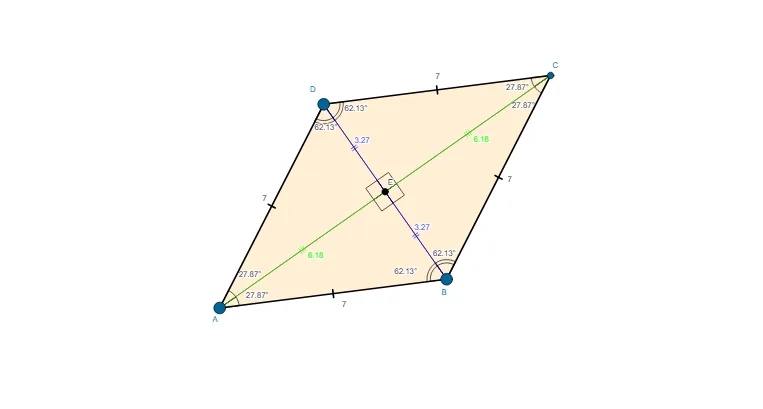
This example demonstrates, through a GeoGebra construction, how a rhombus and associated circle geometry (including an inscribed/inner circle relationship) yield consistent angle and segment structures. It centers on core ideas such as rhombus symmetry and equal-side properties, the geometric meaning of an incircle/inscribed circle (tangency to sides), and the use of circle intersection points to drive a reliable construction. Construction workflow: using Circle and Point to create the key circles and points, Intersect to compute intersection points, Segment to connect required vertices/edges, Polygon to form the rhombus, and Angle to mark and compare multiple angles (e.g., α, β, γ, δ) for visible invariants. Suitable for middle school through early university learners, and ideal for classroom demonstrations, geometry review, and hands-on geometric construction practice.
GeoGebra Commands & Parameters
Circle(A, B) → cPoint(c) → DCircle(B, A) → dCircle(D, A) → eIntersect(d, e, 2) → CSegment(A, B) → aSegment(B, C) → bSegment(C, D) → fSegment(D, A) → gPolygon(A, B, C, D) → poly1, a_1, b_1, c_1, d_1Segment(D, C) → hSegment(A, C) → iSegment(D, B) → jIntersect(i, j) → ESegment(A, E) → kSegment(E, C) → lSegment(D, E) → mSegment(E, B) → nAngle(A, D, E) → αAngle(E, D, C) → βAngle(E, A, D) → γAngle(B, A, E) → δAngle(E, B, A) → εAngle(C, B, E) → ζAngle(E, C, B) → ηAngle(D, C, E) → θAngle(D, E, A) → ιAngle(A, E, B) → κAngle(C, E, D) → λAngle(B, E, C) → μ
AI Drawing Prompt Reference
Draw a rhombus with an inscribed circle. Start by creating two intersecting circles to determine the vertices of the rhombus, then connect these points to form the rhombus. Next, identify the points where the incircle touches the sides of the rhombus, and draw lines from these points to the vertices. Label the angles inside the rhombus and at the points of tangency to highlight the geometric relationships and symmetry.
The prompt above was compiled from the original drawing commands and is for reference only.