
Rhombus Lab
Loading the math board and drawing, please wait…
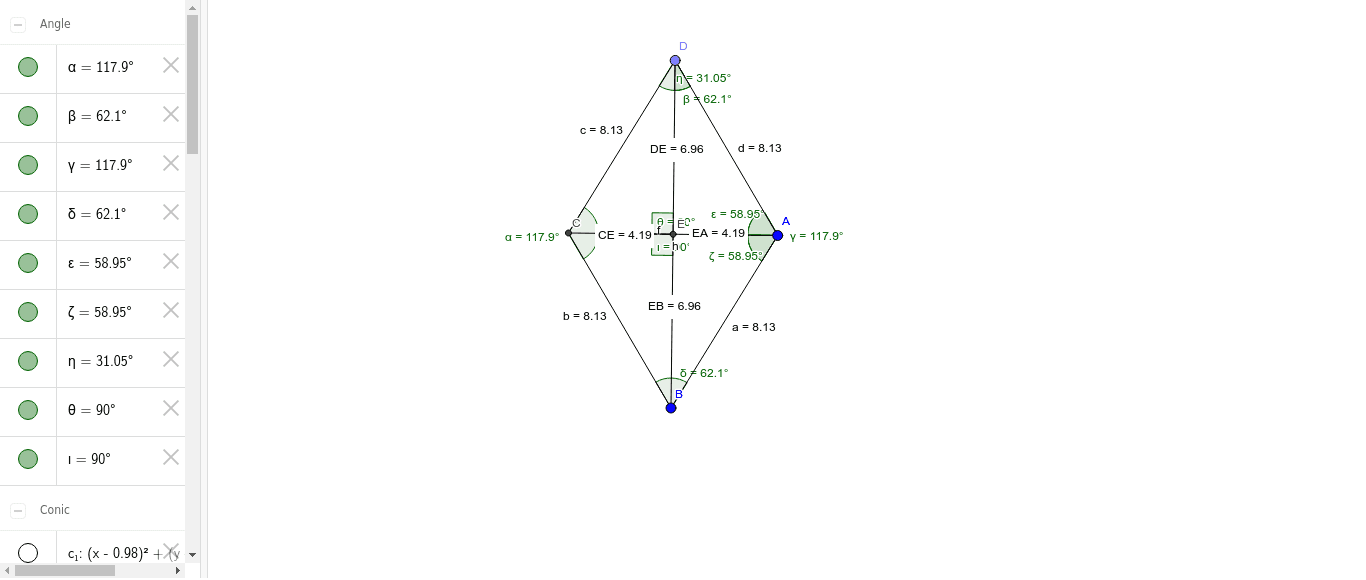
This example demonstrates the geometric properties of a rhombus and related mathematical concepts including polygons, angles, distance calculations, piecewise functions, and statistical graphs like box plots. It uses commands such as Point, Line, Segment, Circle, Intersect, Angle, and Distance in GeoGebra for construction, making it suitable for high school mathematics teaching or geometric construction practice.
GeoGebra Commands & Parameters
Point(yAxis) → FPoint(yAxis) → GLine(F, G) → gSegment(A, B) → aCircle(A, B) → c_1Point(c_1) → DSegment(A, D) → dCircle(D, A) → d_1Circle(B, A) → eIntersect(d_1, e, 2) → CSegment(D, C) → cSegment(B, C) → bAngle(B, C, D) → αAngle(C, D, A) → βAngle(D, A, B) → γAngle(A, B, C) → δSegment(D, B) → fSegment(C, A) → hIntersect(f, h) → EDistance(C, E) → distanceCEDistance(E, A) → distanceEADistance(D, E) → distanceDEDistance(E, B) → distanceEBAngle(D, A, E) → εAngle(E, A, B) → ζAngle(E, D, A) → ηAngle(D, E, C) → θAngle(C, E, B) → ι
AI Drawing Prompt Reference
Draw a rhombus by first creating two intersecting line segments to determine the center point, then use the vertices and center as radii to draw circles, find their intersections with the line segments, and connect these points to form the rhombus. Label the four sides, angles, and diagonals of the rhombus, and measure and annotate the lengths of the diagonals and the angles.
The prompt above was compiled from the original drawing commands and is for reference only.