
Rhombus Construction with Side, Diagonal, and Angle Measurements
Loading the math board and drawing, please wait…
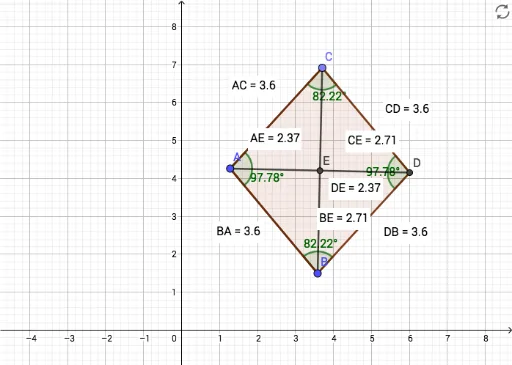
This GeoGebra example demonstrates how to construct a rhombus from a segment and a circle, then dynamically measure its side lengths, diagonals, and interior angles. The core mathematical concepts include the definition of a rhombus (all sides equal), properties of diagonals (perpendicular bisectors), parallel opposite sides, and equal opposite angles. Construction steps: use the Segment command to create initial side AB, draw a circle centered at A with radius AB, pick point C on the circle, then use Line and Intersect commands to determine the remaining vertex D, and finally use Polygon to form the rhombus. Distance commands measure all sides and diagonals, while Angle commands label the four interior angles α, β, γ, δ, with text objects displaying numeric values. This resource is suitable for middle school geometry classes to explore rhombus properties intuitively, and can also serve as an introductory exercise for coordinate geometry and distance calculations in high school.
GeoGebra Commands & Parameters
Segment(A, B) → fCircle(A, B) → cPoint(c) → CSegment(A, C) → gLine(C, f) → hLine(B, g) → iIntersect(h, i) → DSegment(C, D) → jSegment(D, B) → kSegment(B, A) → lSegment(A, C) → mDistance(A, C) → distanceACDistance(C, D) → distanceCDDistance(D, B) → distanceDBDistance(B, A) → distanceBAAngle(A, C, D) → αAngle(B, A, C) → βAngle(D, B, A) → γAngle(C, D, B) → δSegment(C, B) → nSegment(A, D) → pIntersect(n, p) → EDistance(C, E) → distanceCEDistance(D, E) → distanceDEDistance(B, E) → distanceBEDistance(A, E) → distanceAEPolygon(C, D, B, A) → q1, c_1, d, b, a