
Rhombus Construction Demo by HinghamProject
Loading the math board and drawing, please wait…
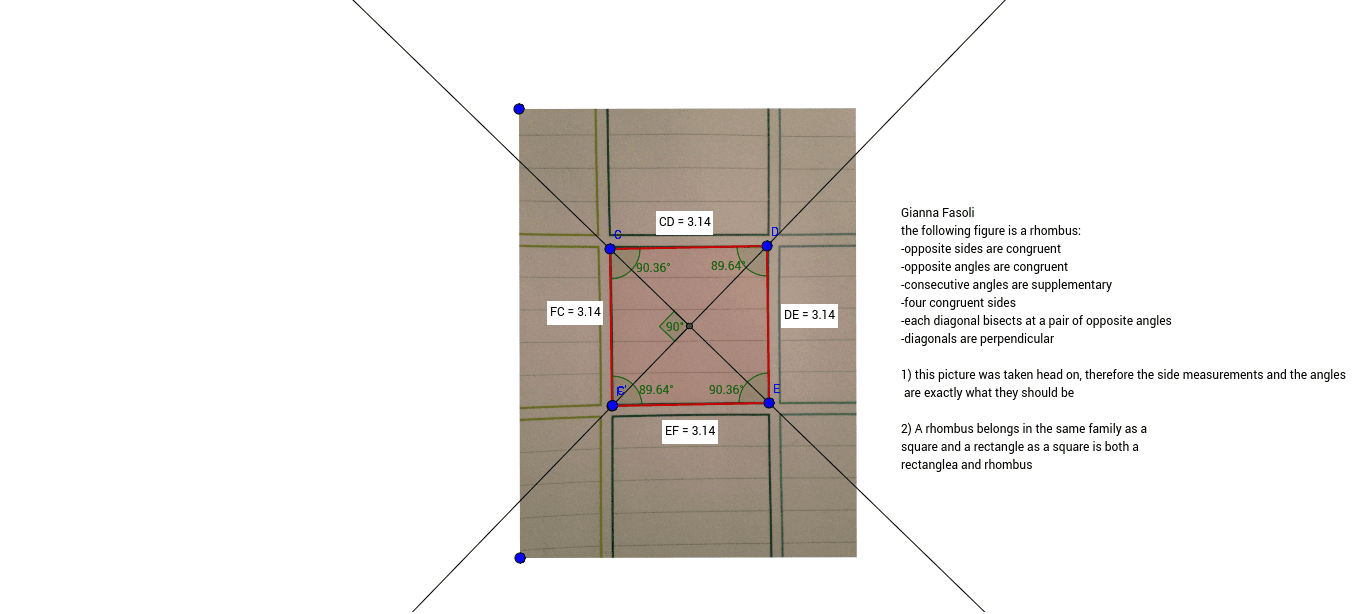
This example demonstrates the geometric construction of a rhombus and its properties. Key math concepts include polygons, distance measurement, angles, angle bisectors, and rotations. GeoGebra commands used are Polygon, Distance, LineBisector, Angle, Intersect, and Rotate. Suitable for high school mathematics education to understand symmetry and geometric transformations of rhombuses.
GeoGebra Commands & Parameters
Polygon(C, D, E, F) → poly1, c, d, e, fDistance(C, D) → distanceCDDistance(D, E) → distanceDEDistance(E, F) → distanceEFDistance(F, C) → distanceFCLineBisector(C, E) → aLineBisector(D, F) → bAngle(F, C, D) → αAngle(C, D, E) → βAngle(D, E, F) → γAngle(E, F, C) → δIntersect(a, b) → GRotate(C, 90°, G) → C'Angle(C, G, C') → ε
AI Drawing Prompt Reference
Draw a rhombus using points C, D, E, and F as vertices. Measure the distances CD, DE, EF, and FC to ensure they are equal. Draw the perpendicular bisectors of CE and DF, which intersect at point G. Rotate point C 90 degrees around G to get C', and measure the angle ε between C, G, and C'. The diagonals of the rhombus are perpendicular and bisect each other, and angles α, β, γ, and δ are equal.
The prompt above was compiled from the original drawing commands and is for reference only.