
Rhombus Construction by shubbs2019
Loading the math board and drawing, please wait…
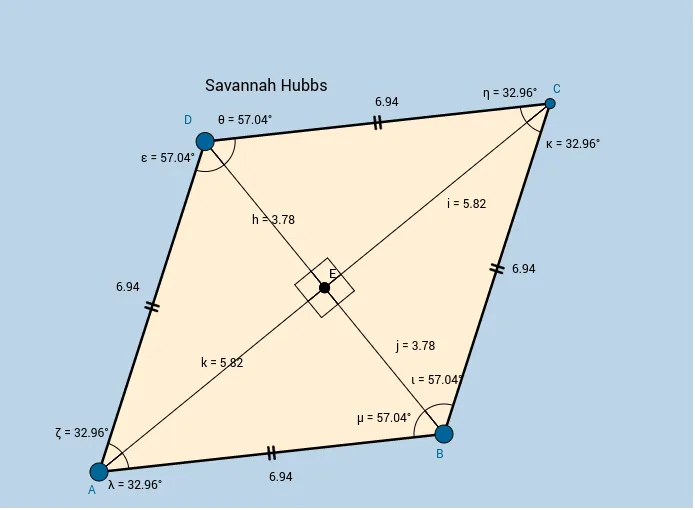
This example demonstrates the construction of a rhombus. Key mathematical concepts include linear equations, special points, and vectors. Using GeoGebra commands such as Circle, Point, Intersect, Segment, and Polygon, the construction process is clearly illustrated. Suitable for students at the middle school level and above.
GeoGebra Commands & Parameters
Circle(A, B) → cPoint(c) → DCircle(B, A) → dCircle(D, A) → eIntersect(d, e, 2) → CSegment(A, B) → aSegment(B, C) → bSegment(C, D) → fSegment(D, A) → gPolygon(A, B, C, D) → poly1, a_1, b_1, c_1, d_1Midpoint(A, C) → EMidpoint(D, B) → FSegment(D, E) → hSegment(E, C) → iSegment(B, E) → jSegment(E, A) → kAngle(D, E, A) → αAngle(A, E, B) → βAngle(B, E, C) → γAngle(C, E, D) → δAngle(A, D, E) → εAngle(E, A, D) → ζAngle(D, C, E) → ηAngle(E, D, C) → θAngle(C, B, E) → ιAngle(E, C, B) → κAngle(B, A, E) → λAngle(E, B, A) → μ
AI Drawing Prompt Reference
Draw a rhombus by intersecting two circles and connecting their intersection points to form the vertices. Then, draw the diagonals and find their intersection point. Label the vertices, diagonals, and angles.
The prompt above was compiled from the original drawing commands and is for reference only.