
Rhombus Area Calculation and Geometric Construction
Loading the math board and drawing, please wait…
In collections
geometriadinamica.es
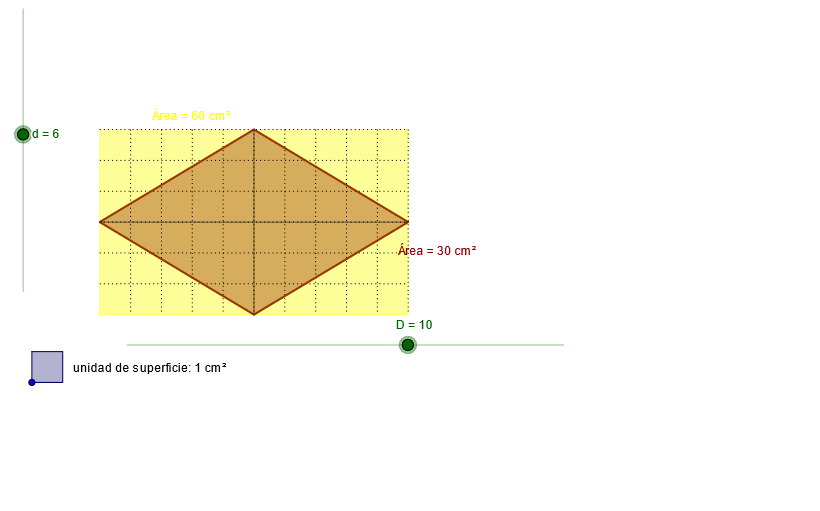
This example demonstrates the calculation of the area of a rhombus, involving key mathematical concepts such as rhombus properties, area formulas, and geometric construction techniques. The construction involves GeoGebra commands like Circle, Ray, OrthogonalLine, etc. Suitable for middle school students learning geometry fundamentals or for mathematical teaching assistance.
GeoGebra Commands & Parameters
Circle(A, D) → cRay(A, B) → aCircle(A, d) → d_5OrthogonalLine(A, a) → bIntersect(d_5, b, 1) → COrthogonalLine(C, b) → eIntersect(c, a, 1) → D_3OrthogonalLine(D_3, a) → fIntersect(f, e) → EPolygon(A, C, E, D_3) → P, a_1, c_1, e_1, d_1Circle(A, g) → hIntersect(h, a_1) → F,Intersect(h, d_1) → G,Mirror(A, G) → HMirror(G, H) → IMirror(H, I) → JMirror(I, J) → KMirror(J, K) → LMirror(K, L) → MMirror(L, M) → NMirror(M, N) → OMirror(N, O) → QMirror(O, Q) → RMirror(Q, R) → SMirror(R, S) → TMirror(S, T) → UMirror(A, F) → VMirror(F, V) → WMirror(V, W) → YMirror(W, Y) → ZMirror(Y, Z) → A_1Mirror(Z, A_1) → B_1Mirror(A_1, B_1) → C_1Mirror(B_1, C_1) → D_1OrthogonalLine(G, d_1) → iOrthogonalLine(H, d_1) → jOrthogonalLine(I, d_1) → kOrthogonalLine(J, d_1) → lOrthogonalLine(K, d_1) → mOrthogonalLine(L, d_1) → nOrthogonalLine(M, d_1) → pOrthogonalLine(N, d_1) → qOrthogonalLine(O, d_1) → rOrthogonalLine(Q, d_1) → sOrthogonalLine(R, d_1) → tOrthogonalLine(S, d_1) → b_1OrthogonalLine(T, d_1) → f_1OrthogonalLine(U, d_1) → g_1OrthogonalLine(F, a_1) → h_1OrthogonalLine(V, a_1) → i_1OrthogonalLine(W, a_1) → j_1OrthogonalLine(Y, a_1) → k_1OrthogonalLine(Z, a_1) → l_1OrthogonalLine(A_1, a_1) → m_1OrthogonalLine(B_1, a_1) → n_1OrthogonalLine(C_1, a_1) → p_1OrthogonalLine(D_1, a_1) → q_1Intersect(c_1, i) → E_1Intersect(r, c_1) → F_1Segment(F_1, O) → r_1Intersect(j, c_1) → G_1Intersect(k, c_1) → H_1Intersect(l, c_1) → I_1Intersect(m, c_1) → J_1Intersect(n, c_1) → K_1Intersect(p, c_1) → L_1Intersect(q, c_1) → M_1Intersect(s, c_1) → N_1Intersect(t, c_1) → O_1Intersect(b_1, c_1) → P_1Intersect(f_1, c_1) → Q_1Intersect(g_1, c_1) → R_1Intersect(e_1, q_1) → S_1Intersect(e_1, p_1) → T_1Intersect(e_1, n_1) → U_1Intersect(m_1, e_1) → V_1Intersect(l_1, e_1) → W_1Intersect(k_1, e_1) → Y_1Intersect(j_1, e_1) → Z_1Intersect(i_1, e_1) → A_2Intersect(h_1, e_1) → B_2Segment(E_1, G) → s_1Segment(G_1, H) → t_1Segment(H_1, I) → a_2Segment(I_1, J) → b_2Segment(J_1, K) → c_2Segment(K_1, L) → d_2Segment(L_1, M) → e_2Segment(M_1, N) → f_2Segment(N_1, Q) → g_2Segment(O_1, R) → h_2Segment(P_1, S) → i_2Segment(Q_1, T) → j_2Segment(R_1, U) → k_2Segment(D_1, S_1) → l_2Segment(C_1, T_1) → m_2Segment(B_1, U_1) → n_2Segment(A_1, V_1) → p_2Segment(Z, W_1) → q_2Segment(Y, Y_1) → r_2Segment(W, Z_1) → s_2Segment(V, A_2) → t_2Segment(F, B_2) → a_3Circle(C_2, o) → c_3Point(c_3) → D_2Segment(C_2, D_2) → b_3Circle(D_2, C_2) → d_3OrthogonalLine(D_2, b_3) → e_3OrthogonalLine(C_2, b_3) → f_3Intersect(c_3, f_3, 2) → E_2Intersect(d_3, e_3, 2) → F_2Polygon(E_2, F_2, D_2, C_2) → P_2, e_4, f_4, d_4, c_4Midpoint(A, C) → G_2Midpoint(C, E) → H_2Midpoint(E, D_3) → I_2Midpoint(D_3, A) → J_2Polygon(G_2, H_2, I_2, J_2) → Q_2, g_3, h_3, i_3, j_3Segment(G_2, I_2) → k_3Segment(H_2, J_2) → l_3
AI Drawing Prompt Reference
Draw a rhombus by constructing two circles centered at one vertex, intersecting to determine the diagonals. Then, use perpendicular lines to find the other two vertices and connect them to form the rhombus. Next, draw an inscribed circle using the midpoint of one side, find intersections, and mirror the points to create a symmetric pattern around the rhombus.
The prompt above was compiled from the original drawing commands and is for reference only.