
Rhombus and Related Mathematical Concepts Demonstration
Loading the math board and drawing, please wait…
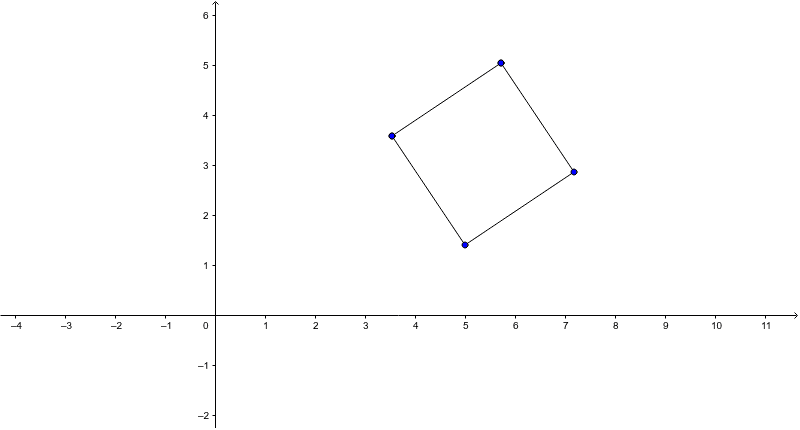
This example dynamically demonstrates the construction of a rhombus and its relationship with rotation, visually showcasing the basic properties of a rhombus. The core mathematical concepts involved include rhombus, rational numbers, piecewise functions, sequences and series, Pythagorean theorem, and percentages. The construction highlights the use of GeoGebra commands/objects: Segment (line segment) and Rotate (rotation). It is suitable for high school mathematics teaching, helping students understand the connection between geometric transformations and algebraic representations, enhancing spatial reasoning skills.
GeoGebra Commands & Parameters
Segment(A, B) → aRotate(A, -90*°, B) → A'Rotate(B, -90*°, B) → B'Segment(A', B') → a'Rotate(A', -90*°, A') → A''Rotate(B', -90*°, A') → B''Segment(A'', B'') → a''Segment(B'', A) → b
AI Drawing Prompt Reference
Draw a rhombus starting with a horizontal base segment. Rotate this segment 90 degrees counterclockwise about its right endpoint to form the top side, then rotate that top side 90 degrees counterclockwise about its right endpoint to form the left side, and finally connect the left side's lower endpoint back to the base's left endpoint to close the shape. This construction uses successive rotations to create four equal-length sides, visually demonstrating the rhombus's rotational symmetry, with a slider to adjust the rotation angle and show the link between geometric transformation and algebraic representation.
The prompt above was compiled from the original drawing commands and is for reference only.