
Resultant Line of Action
Loading the math board and drawing, please wait…
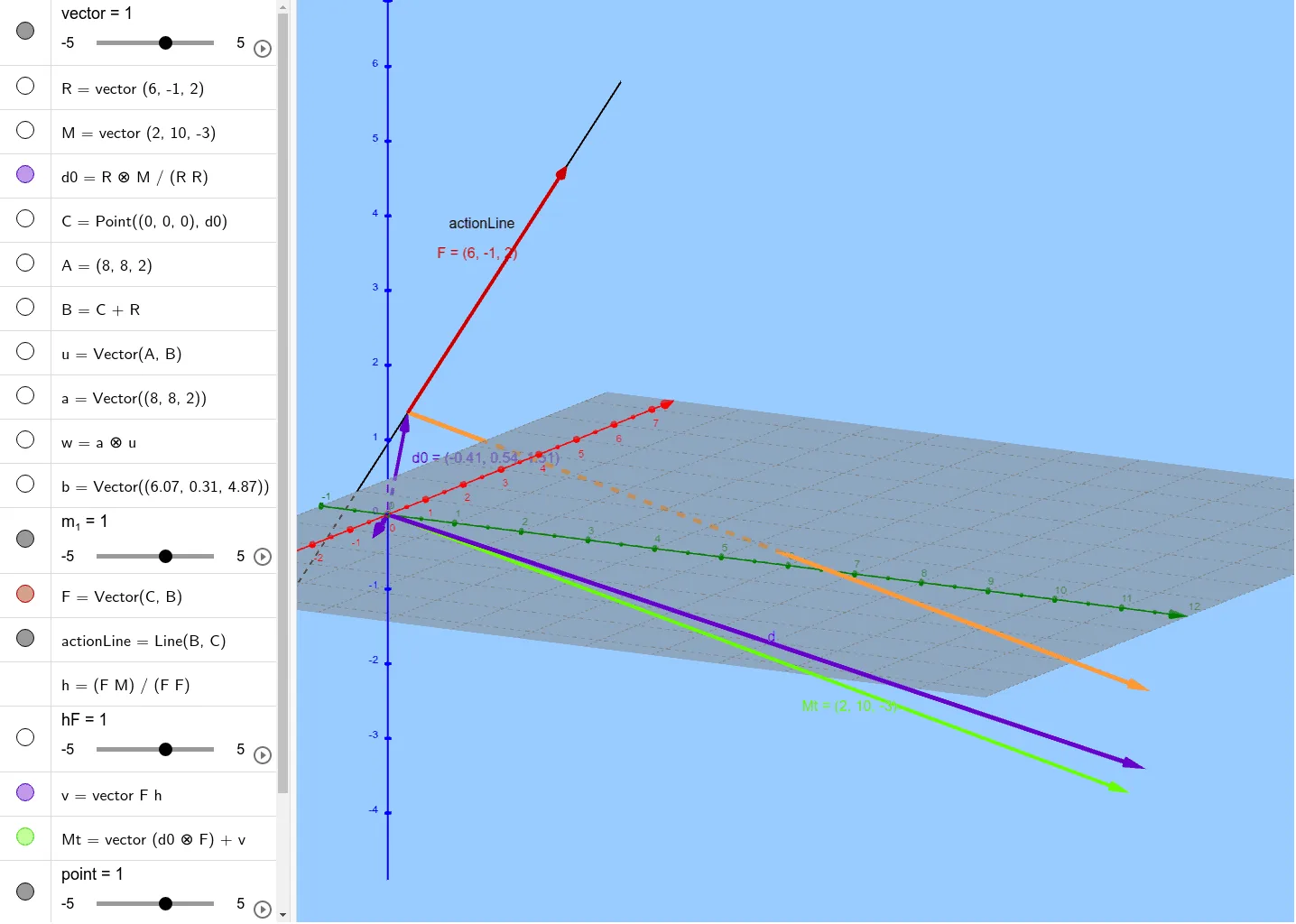
This example demonstrates the geometric method to locate the resultant line of action in 3D space given the resultant torque. It involves core math concepts like vector operations, coordinate geometry, integral and differential calculus, and solid geometry. Construction highlights include using GeoGebra commands like Point, Vector, and Line to build vectors, torque, and action lines. Suitable for university physics or engineering students to understand the spatial relationship between torque and action lines and their calculations.
GeoGebra Commands & Parameters
Point((0, 0, 0), d0) → CVector(A, B) → uVector((8, 8, 2)) → aVector((6.074, 0.308, 4.871)) → bVector(C, B) → FLine(B, C) → actionLineVector(C, D) → c
AI Drawing Prompt Reference
Draw a resultant line of action in 3D space. Start by creating a point C at the origin, then define two vectors u and a. Next, define another vector b using point C. Create vector F using point C and vector b, and then create the resultant line using points B and C. Finally, create another vector using point C and vector c. These steps demonstrate how to determine the position of the resultant line using vector operations and coordinate geometry.
The prompt above was compiled from the original drawing commands and is for reference only.