
Representing Small Numbers on a Number Line with Reflections
Loading the math board and drawing, please wait…
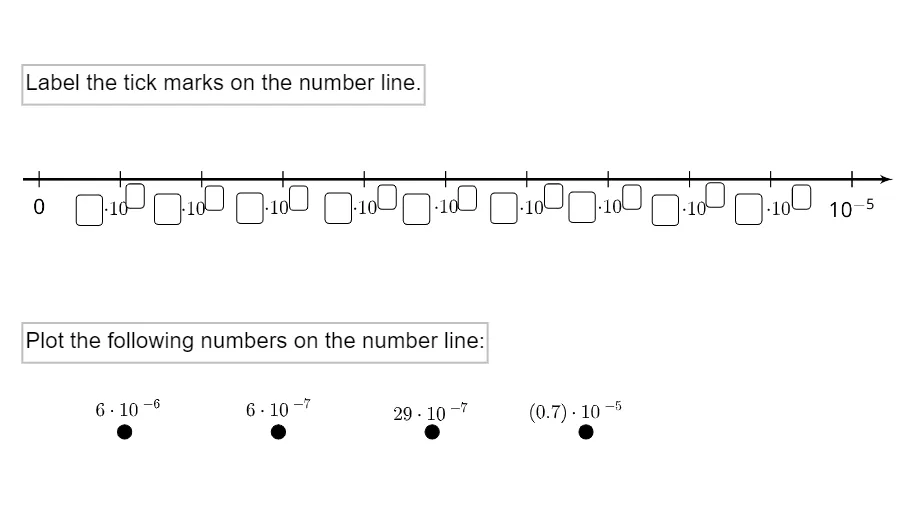
This example demonstrates how to represent and locate small decimal numbers on the number line using geometric constructions. It emphasizes visually mapping decimal values (including numbers less than 1) to corresponding points on the line, using reflection/mirroring as a reference mechanism to make the magnitude and sign clearer. Key concepts include number-line representations, coordinate meaning with positive/negative values, decimal as a partitioned scale, and the role of geometric transformations—especially reflections—in positioning coordinates. The construction is driven by GeoGebra input and labeling tools: numerous Textfield/InputBox controls (e.g., InputBox3–InputBox20 and text3–text17) allow students to input values and display intermediate annotations, while predefined labeled objects (such as points A, B, C, D and additional items like E, F, pic1) provide the geometric references used to place the decimal points. Suitable for middle school learners and math instruction when introducing or practicing decimal reading/writing and number-line reasoning.
GeoGebra Commands & Parameters
Textfield() → InputBox3Textfield() → InputBox4Textfield() → InputBox5Textfield() → InputBox6Textfield() → InputBox7Textfield() → InputBox8Textfield() → InputBox9Textfield() → InputBox10Textfield() → InputBox11Textfield() → InputBox12Textfield() → InputBox13Textfield() → InputBox14Textfield() → InputBox15Textfield() → InputBox16Textfield() → InputBox17Textfield() → InputBox18Textfield() → InputBox19Textfield() → InputBox20
AI Drawing Prompt Reference
Draw a number line with positive and negative numbers and fraction points. Use reflections to help locate decimal points, such as reflecting 0.5 on the line. Include points like A, B, C, D to represent different values. Ensure distances between points correspond to numerical values and label them accordingly.
The prompt above was compiled from the original drawing commands and is for reference only.