
Represent Irrational Numbers Using Pythagoras Theorem
Loading the math board and drawing, please wait…
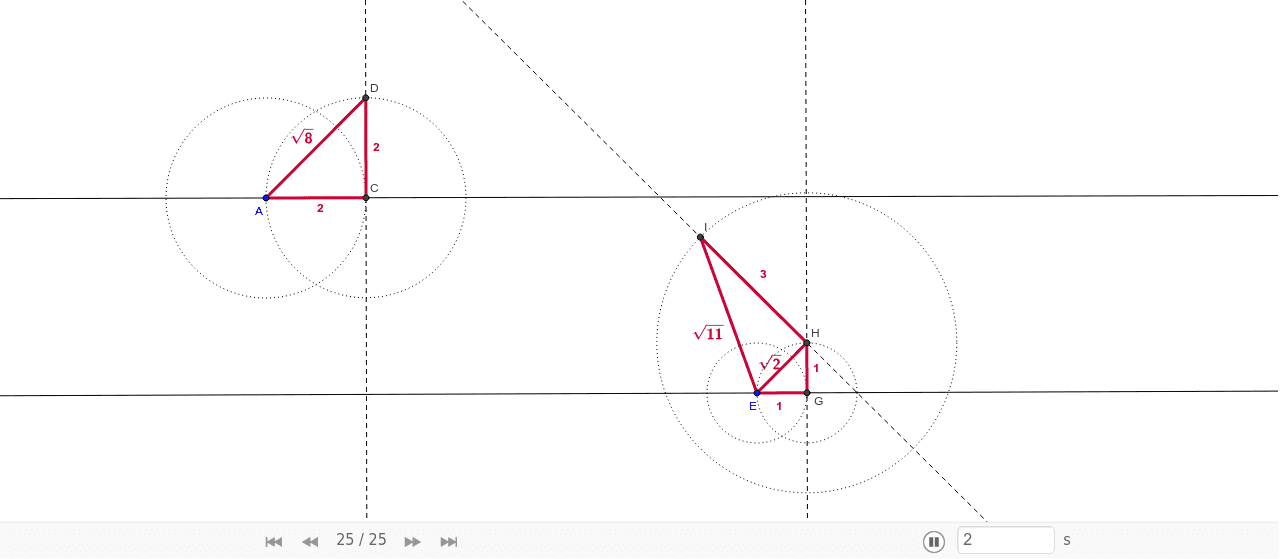
This example dynamically demonstrates how to construct irrational numbers like √2 using the Pythagorean theorem by constructing right triangles. Key math concepts include Pythagorean theorem, irrational numbers, right triangles, and real numbers. GeoGebra commands used are Line, Circle, Intersect, Segment, and OrthogonalLine to build geometric figures. Suitable for high school mathematics education to understand the geometric meaning of irrational numbers and the application of the Pythagorean theorem.
GeoGebra Commands & Parameters
Line(A, B) → aCircle(A, 2) → cIntersect(c, a, 2) → CSegment(A, C) → bOrthogonalLine(C, a) → dCircle(C, 2) → eIntersect(e, d, 2) → DSegment(C, D) → fSegment(A, D) → gLine(E, F) → hCircle(E, 1) → kIntersect(k, h, 2) → GSegment(E, G) → jOrthogonalLine(G, h) → lCircle(G, 1) → pIntersect(p, l, 2) → HSegment(G, H) → mSegment(E, H) → nOrthogonalLine(H, n) → qCircle(H, 3) → rIntersect(r, q, 2) → ISegment(H, I) → sSegment(E, I) → tOrthogonalLine(G, h) → i
AI Drawing Prompt Reference
Draw a right triangle with one leg as a base. Construct a circle with the base as the diameter and mark the intersection point with the hypotenuse. Connect this point to the right angle vertex. Repeat the process by drawing a circle centered at the intersection point and intersecting it with a line perpendicular to the base. This visually demonstrates the construction of irrational numbers like √2 using the Pythagorean theorem.
The prompt above was compiled from the original drawing commands and is for reference only.