
Relative Frequency, Fractions and Percent Conversion: Choosing Sports
Loading the math board and drawing, please wait…
In collections
Wiederholung: absolute, relative & prozentuelle Häufigkeit
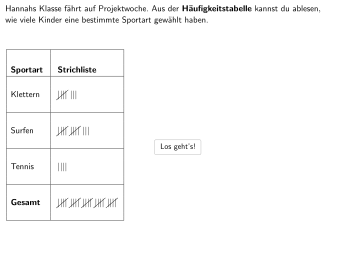
This GeoGebra lesson uses interactive multiple-choice and open-response tasks to demonstrate how a sports-selection dataset is converted into relative frequencies and then expressed in fraction, decimal, and percent forms. Students investigate what share of children selected a given sport (including cases like 16%), explain why making a frequency table is useful, and justify why the sum of all relative frequencies always equals 1. The construction emphasizes core probability & statistics ideas: computing relative frequency, translating between representations, and reasoning about totals. It is built with interactive selection and feedback logic using objects and commands such as SelectedIndex (option indexing), If (correct/incorrect checks), Textfield/InputBox (student answers), and multiple question-flow objects (questions, q1–q5, question) plus navigation buttons (buttonStart, buttonForward, buttonBackward, buttonWeiter, solution buttons). Data and results are organized into table objects (tabel1–tabel4), while selection-related objects (sports, sports2, studentAnswer, studentAnswer2, marginDropdown) store and display outcomes; additional objects like correct, totalAttempts, and buttonLatex support validation and guided presentation. Suitable for grades 5–6 and for classroom practice on introductory statistics, data representation, and percentage reasoning.
GeoGebra Commands & Parameters
SelectedIndex(sports) → studentAnswerSelectedIndex(sports2) → studentAnswer2If(move ≟ 4, c1, If[move ≟ 5, c2, true]) → correctTextfield(aInput) → InputBox1Textfield(bInput) → InputBox2Polygon(B, F, G, H) → q8, b, f_1, g_1, h_1Textfield(cInput) → InputBox3Textfield(dInput) → InputBox4Textfield(eInput) → InputBox5
AI Drawing Prompt Reference
Create a chart showing sports selection data with multiple options for selection, displaying relative frequencies in fraction, decimal, and percent forms. Include interactive elements like selection indices, correctness checks, text input boxes, and navigation buttons. Organize data in tables and present results as graphics and text, emphasizing core probability and statistics concepts.
The prompt above was compiled from the original drawing commands and is for reference only.