
Rekenrek Addition Demo by Duane Habecker
Loading the math board and drawing, please wait…
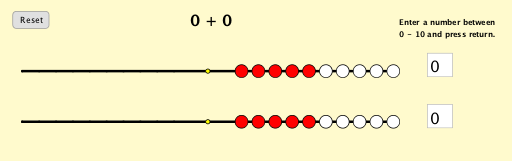
This example dynamically demonstrates Rekenrek addition, visually illustrating the principles of addition. It involves core math concepts like addition operations, natural numbers, number line representation, and function graphs. GeoGebra commands and objects used in construction include OrthogonalLine, Circle, Intersect, Sequence, Segment, Point, Line, and Textfield. Suitable for lower elementary mathematics teaching to help students understand addition operations and develop number sense.
GeoGebra Commands & Parameters
OrthogonalLine(A_1, yAxis) → f_1Circle(A_1, linelength) → c_1Intersect(c_1, f_1, 2) → ASequence((x(A) + (i * beadsize), y(A)), i, 0, 9) → rowoneleftIntersect(c_1, f_1, 1) → BSequence((x(B) + ((i - 9) * beadsize), y(B)), i, 0, 9) → rowonerightSegment(Element[rowoneleft, 3], Element[rowoneright, 3]) → cSegment(Element[rowoneleft, 4], Element[rowoneright, 4]) → dSegment(Element[rowoneleft, 5], Element[rowoneright, 5]) → eSegment(Element[rowoneleft, 6], Element[rowoneright, 6]) → fSegment(Element[rowoneleft, 7], Element[rowoneright, 7]) → gSegment(Element[rowoneleft, 8], Element[rowoneright, 8]) → hSegment(Element[rowoneleft, 9], Element[rowoneright, 9]) → iSegment(Element[rowoneleft, 10], Element[rowoneright, 10]) → jSegment(Element[rowoneleft, 2], Element[rowoneright, 2]) → bSegment(Element[rowoneleft, 1], Element[rowoneright, 1]) → aSegment(A, B) → kPoint(a) → CPoint(b) → DPoint(c) → EPoint(d) → FPoint(e) → GPoint(f) → HPoint(g) → IPoint(h) → JPoint(i) → KPoint(j) → LPoint(a) → MPoint(b) → NPoint(c) → OPoint(d) → PPoint(e) → QPoint(f) → RPoint(g) → SPoint(h) → TPoint(i) → UPoint(j) → VCircle(W, linelength) → pLine(W, f_1) → lIntersect(p, l, 2) → ZIntersect(p, l, 1) → B_1Sequence((x(Z) + (i * beadsize), y(Z)), i, 0, 9) → rowtwoleftSequence((x(B_1) + ((i - 9) * beadsize), y(B_1)), i, 0, 9) → rowtworightSegment(Z, B_1) → mSegment(Element[rowtwoleft, 1], Element[rowtworight, 1]) → nSegment(Element[rowtwoleft, 2], Element[rowtworight, 2]) → qSegment(Element[rowtwoleft, 3], Element[rowtworight, 3]) → rSegment(Element[rowtwoleft, 4], Element[rowtworight, 4]) → sSegment(Element[rowtwoleft, 5], Element[rowtworight, 5]) → tSegment(Element[rowtwoleft, 6], Element[rowtworight, 6]) → g_1Segment(Element[rowtwoleft, 7], Element[rowtworight, 7]) → h_1Segment(Element[rowtwoleft, 8], Element[rowtworight, 8]) → i_1Segment(Element[rowtwoleft, 9], Element[rowtworight, 9]) → j_1Segment(Element[rowtwoleft, 10], Element[rowtworight, 10]) → k_1Point(n) → C_1Point(n) → D_1Point(q) → E_1Point(q) → F_1Point(r) → G_1Point(r) → H_1Point(s) → I_1Point(s) → J_1Point(t) → K_1Point(t) → L_1Point(g_1) → M_1Point(g_1) → N_1Point(h_1) → O_1Point(h_1) → P_1Point(i_1) → Q_1Point(i_1) → R_1Point(j_1) → S_1Point(j_1) → T_1Point(k_1) → U_1Point(k_1) → V_1Textfield(inputonetext) → inputoneTextfield(inputtwotext) → inputtwo
AI Drawing Prompt Reference
Draw a Rekenrek addition demonstration with two number lines, each containing 10 beads connected by segments. The left number line represents the first addend, and the right number line represents the second addend. Connect the beads on both number lines with segments to visually demonstrate the addition operation.
The prompt above was compiled from the original drawing commands and is for reference only.