
Regular Mandala
Loading the math board and drawing, please wait…
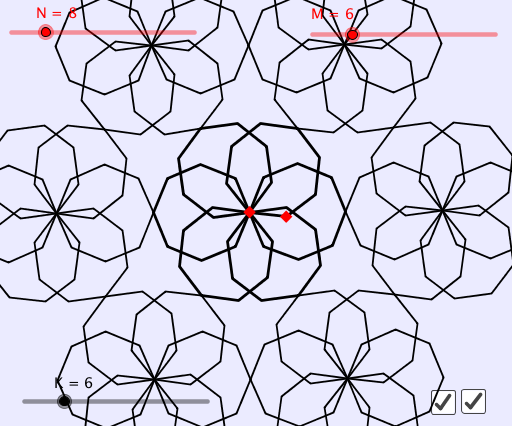
This example demonstrates how to create a regular mandala pattern using rotations and geometric transformations. It involves core mathematical concepts such as angles, rotation, line segments, similarity transformations, isosceles triangles, and statistical characteristics. The construction uses GeoGebra commands like Intersect, Polygon, and Sequence, with objects including A, B, N, M, ang1, C, poly1, list1, K, list2, a, b. Suitable for high school mathematics education to illustrate geometric transformations and pattern generation.
GeoGebra Commands & Parameters
Intersect(Ray[A, Rotate[B, ang1, A]], Ray[B, Rotate[A, (-ang1), B]]) → CPolygon(Sequence[Rotate[A, ((i * 360 / N))°, C], i, 1, N]) → poly1Sequence(Rotate[poly1, ((i * 360) * ° / M), A], i, 1, M) → list1Sequence(Rotate[Rotate[list1, 180°, Rotate[A, ((floor(N / 2) * 360) * ° / N), C]], ((i * 360) * ° / K), A], i, 1, K) → list2
AI Drawing Prompt Reference
Create a mandala pattern based on rotational symmetry. Start with an isosceles triangle formed by two rays and their rotated mirrors intersecting at a common vertex. Use this vertex as the center to rotate one triangle vertex around in equal angular steps, generating a regular polygon. Then rotate this polygon around the same center multiple times to form a circular array. Finally, rotate the entire array and add a mirrored copy to create a complex, layered symmetric design. The result is a radial, multi-tiered geometric pattern illustrating angles, rotation, and symmetry.
The prompt above was compiled from the original drawing commands and is for reference only.