
Reflections in the Cartesian Plane
Loading the math board and drawing, please wait…
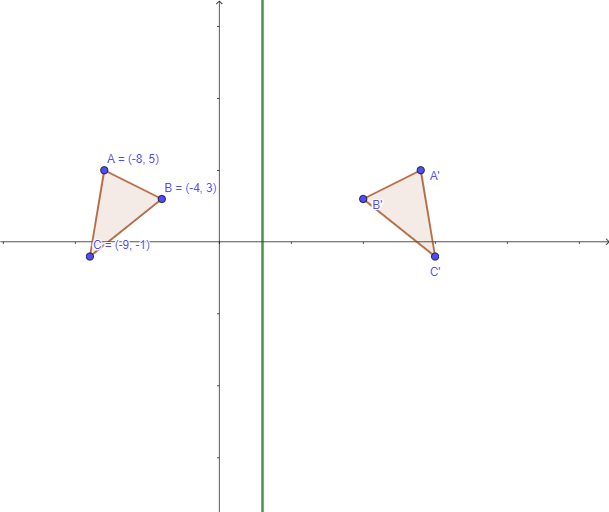
This example demonstrates how to perform reflections of shapes in the Cartesian plane. It involves core mathematical concepts such as geometric transformations, symmetry, distance calculations, and coordinate geometry. Key GeoGebra commands and objects used include Textfield, Polygon, Mirror, Distance, OrthogonalLine, Intersect, and Segment. It is suitable for high school students learning about the properties and applications of geometric transformations.
GeoGebra Commands & Parameters
Textfield(eq1) → InputBox1Polygon(A, B, C) → t1, c, a, bMirror(A, eq1) → A'Mirror(B, eq1) → B'Mirror(C, eq1) → C'Polygon(A', B', C') → t1', c', a', b'Distance(A, eq1) → dDistance(A', eq1) → eOrthogonalLine(A, eq1) → fIntersect(eq1, f) → DSegment(A, D) → gSegment(A', D) → hOrthogonalLine(B, eq1) → jIntersect(j, eq1) → ESegment(B, E) → kSegment(E, B') → lOrthogonalLine(C, eq1) → mIntersect(m, eq1) → FSegment(F, C) → nSegment(F, C') → pTextfield(o) → InputBox2Textfield(q) → InputBox3Textfield(r) → InputBox4Textfield(s) → InputBox5Textfield(t) → InputBox6Textfield(u) → InputBox7
AI Drawing Prompt Reference
Draw a triangle in the Cartesian plane and show its reflection across a given line. Start by plotting the original triangle, then find the reflected points of its vertices across the line using its equation. Connect these reflected points to form the reflected triangle. Next, calculate the distances from the original vertices to the line and draw perpendicular lines to find intersection points. Finally, connect these intersection points to the reflected vertices with line segments to complete the construction.
The prompt above was compiled from the original drawing commands and is for reference only.