
Reflections Across x-Axis, y-Axis, & Origin
Loading the math board and drawing, please wait…
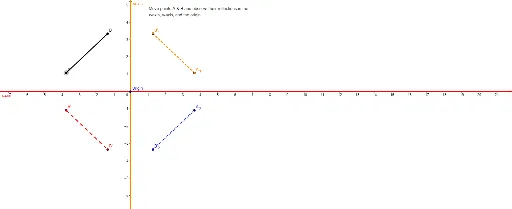
This example demonstrates how to perform reflections across the x-axis, y-axis, and the origin using GeoGebra. Key mathematical concepts include reflection transformations. Using commands like Segment and Mirror, you can construct reflections across the x-axis, y-axis, and the origin. Suitable for students in middle school and above learning geometric transformations.
GeoGebra Commands & Parameters
Segment(A, B) → aMirror(A, xAxis) → A'Mirror(B, xAxis) → B'Segment(A', B') → a'Mirror(A, yAxis) → A'_1Mirror(B, yAxis) → B'_1Segment(A'_1, B'_1) → a'_1Mirror(A, Origin) → A'_2Mirror(B, Origin) → B'_2Segment(A'_2, B'_2) → a'_2
AI Drawing Prompt Reference
Draw an arbitrary line segment with two endpoints. Reflect both endpoints across the x-axis and connect them to form a second segment. Then reflect the original endpoints across the y-axis and connect them for a third segment. Finally, reflect the original endpoints through the origin and connect them for a fourth segment. The final figure shows the original segment plus three reflected segments, clearly demonstrating reflections across the x-axis, y-axis, and origin.
The prompt above was compiled from the original drawing commands and is for reference only.