
Reflection over Y=X
Loading the math board and drawing, please wait…
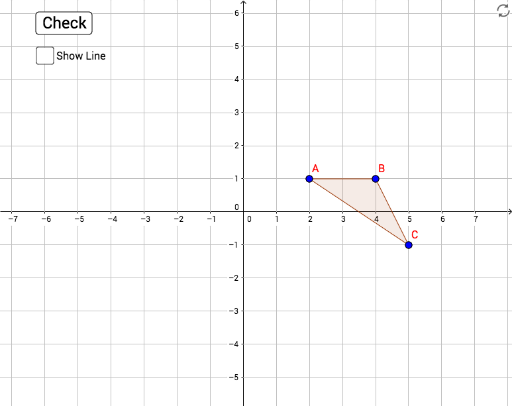
This example demonstrates the reflection transformation of points, line segments, and polygons over the line Y=X. It involves core mathematical concepts such as symmetry, complex numbers, translation, exponential functions, multiplication, and the unit circle. The construction uses GeoGebra commands like Polygon, Line, and Mirror, with objects including A, B, C, poly1, c, a, b, B', A', C', poly3, f, d, e, D, E, g, target1, target2, target3, poly1', c'_1, a'_1, b'_1, step1, step2, step3, correct, nailedIt, tryAgain, button1, h. It is suitable for high school students learning geometric transformations and the application of complex number geometry.
GeoGebra Commands & Parameters
Polygon(A, B, C) → poly1, c, a, bPolygon(A', B', C') → poly3, f, d, eLine(D, E) → gMirror(A, g) → target1Mirror(B, g) → target2Mirror(C, g) → target3Polygon(target1, target2, target3) → poly1', c'_1, a'_1, b'_1
AI Drawing Prompt Reference
Draw a triangle with three vertices, then reflect each vertex over the line Y=X to get three new points, and connect these new points to form a new triangle. Also, draw line segments connecting corresponding vertices of the two triangles to show the reflection relationship.
The prompt above was compiled from the original drawing commands and is for reference only.