
Reflection Exploration
Loading the math board and drawing, please wait…
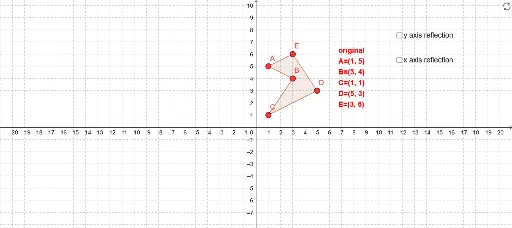
This example demonstrates reflection phenomena, involving reflection geometry. Using GeoGebra commands such as Polygon, Line, and Mirror, you can construct reflected shapes. Suitable for high school geometry education, this example helps students understand the concept of reflection transformation.
GeoGebra Commands & Parameters
Polygon(A, B, C, D, E) → poly1, a, b, c, d, eLine(F, G) → fMirror(A, f) → A'Mirror(B, f) → B'Mirror(C, f) → C'Mirror(D, f) → D'Mirror(E, f) → E'Polygon(A', B', C', D', E') → poly1', a', b', c', d', e'Point(xAxis) → HPoint(xAxis) → ILine(H, I) → jMirror(A, j) → A'_1Mirror(B, j) → B'_1Mirror(C, j) → C'_1Mirror(D, j) → D'_1Mirror(E, j) → E'_1Polygon(A'_1, B'_1, C'_1, D'_1, E'_1) → poly1'_1, a'_1, b'_1, c'_1, d'_1, e'_1
AI Drawing Prompt Reference
Draw a pentagon and a line passing outside it. Reflect each vertex of the pentagon across this line to form a mirrored pentagon, connecting corresponding vertices with dashed lines. Then pick two points on the horizontal axis, draw a second line through them, and reflect the original pentagon across this new line to create another mirrored pentagon. Keep the original shape and both mirror lines visible to illustrate two reflection transformations.
The prompt above was compiled from the original drawing commands and is for reference only.