
Rectangle Template: Exploring Rectangle Properties and Geometric Construction
Loading the math board and drawing, please wait…
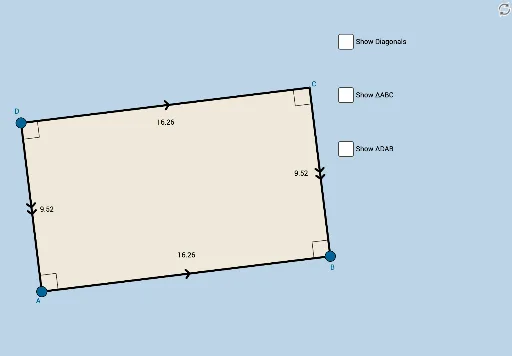
This applet displays a rectangle and its associated geometric elements, designed to help struggling students informally discover properties of rectangles through interactive manipulation. Core mathematical concepts include the definition of a rectangle, diagonals, midpoints, symmetry, and angle relationships. Construction highlights: using GeoGebra commands such as Segment, OrthogonalLine, Point, Intersect, Angle, Midpoint, Polygon, Line, and Mirror, the applet constructs rectangle ABCD, its diagonals, midpoint M, and various auxiliary lines and mirrored figures, involving objects like A, B, C, D, M, poly1, poly_2, and more. Suitable for middle school geometry lessons or student self-exploration, and also serves as a dynamic resource for teachers to demonstrate rectangle properties.
GeoGebra Commands & Parameters
Segment(A, B) → aOrthogonalLine(A, a) → bOrthogonalLine(B, a) → cPoint(b) → DOrthogonalLine(D, b) → dIntersect(c, d) → CSegment(D, A) → eSegment(D, C) → fSegment(C, B) → gAngle(C, B, A) → αAngle(B, A, D) → βAngle(A, D, C) → γAngle(D, C, B) → δMidpoint(D, B) → MSegment(D, M) → hSegment(M, B) → iSegment(A, M) → jSegment(M, C) → kAngle(B, A, M) → εAngle(M, B, A) → ζAngle(D, C, M) → ηAngle(M, D, C) → θAngle(A, D, M) → ιAngle(M, A, D) → κAngle(C, B, M) → λAngle(M, C, B) → μPolygon(A, B, C) → poly1, c_1, a_1, b_1Line(A, C) → nMirror(A, n) → A'Mirror(B, n) → B'Mirror(C, n) → C'Polygon(A', B', C') → poly_2, c', a', b'Polygon(D, A, B) → poly2, b_2, d_1, a_2Mirror(D, a_2) → D'Mirror(A, a_2) → A'_1Mirror(B, a_2) → B'_1Polygon(D', A'_1, B'_1) → poly2', b'_1, d', a'_1Polygon(A, B, C, D) → poly3, a_3, b_3, c_2, d_2Segment(A, C) → qSegment(D, B) → t
AI Drawing Prompt Reference
Draw a rectangle by first creating a base segment, then constructing perpendicular lines at both endpoints. Pick a point on one perpendicular as a vertex, draw a perpendicular through it to intersect the other perpendicular, forming the fourth vertex. Connect the vertices to complete the rectangle. Label all four interior angles. Draw both diagonals, mark their intersection as the midpoint, and connect this midpoint to each vertex, labeling the resulting angles. Then reflect one triangle of the rectangle across a diagonal to create a mirrored triangle, and reflect an adjacent triangle across a side to form another mirrored shape. Finally, outline the rectangle and the two mirrored triangles as polygons, and draw both diagonals.
The prompt above was compiled from the original drawing commands and is for reference only.