
Rectangle Inscribed in a Right Triangle (legs 3 cm and 4 cm)
Loading the math board and drawing, please wait…
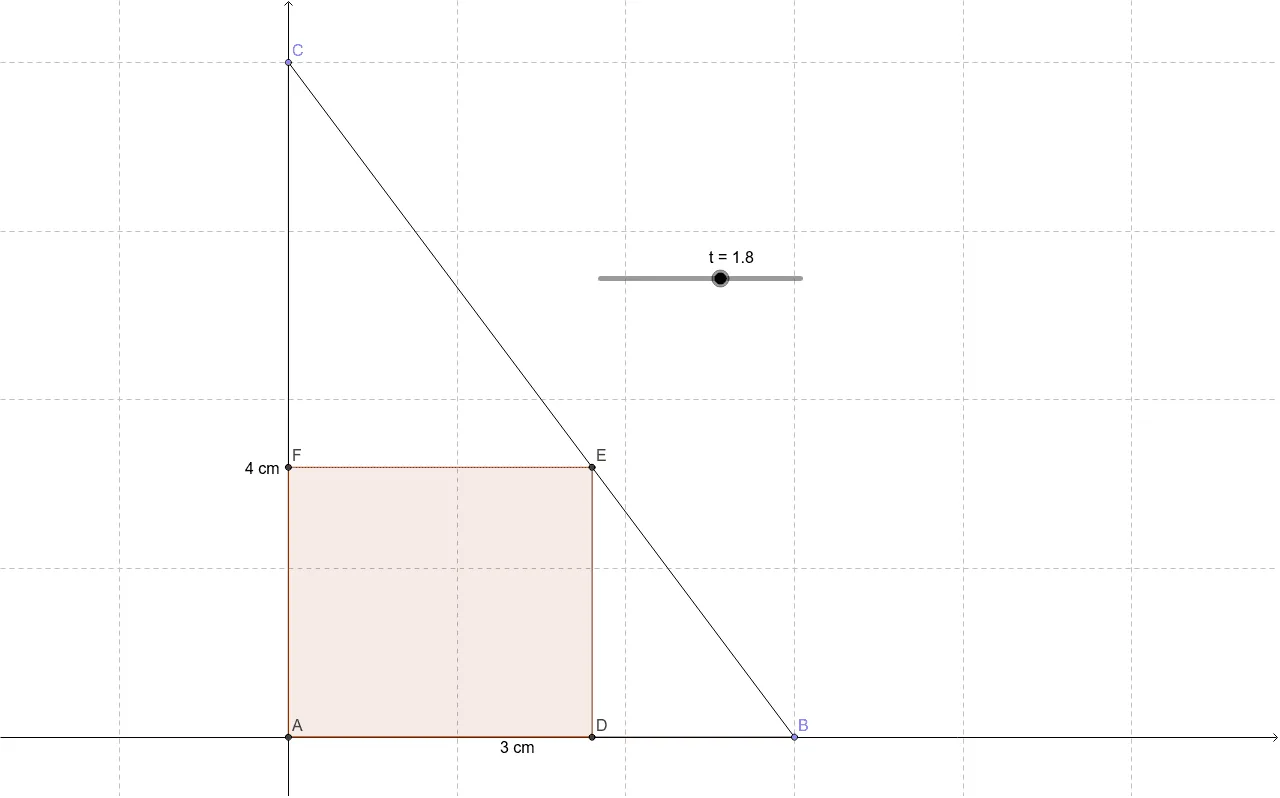
This GeoGebra example demonstrates how to inscribe a rectangle inside a right triangle with legs of 3 cm and 4 cm, where two sides of the rectangle lie along the triangle's legs. The core mathematical concepts involve similar triangles, proportional side lengths, and the optimization of the rectangle's area as its top vertex moves along the hypotenuse. The construction uses GeoGebra commands such as Intersect to find key points, Point to create a movable vertex, Segment and Polygon to build the triangle and rectangle, and text objects to display measurements. This is ideal for middle or high school students exploring geometric constraints, dynamic area variation, and the classic result that the maximum inscribed rectangle occurs when the vertex is at the midpoint of the hypotenuse. It also serves as a visual introduction to optimization problems in geometry.
GeoGebra Commands & Parameters
Intersect(xAxis, yAxis) → APoint(Circle[A, 3]) → BSegment(A, B) → aPoint(Circle[A, abs(4)]) → CSegment(A, C) → bSegment(C, B) → cPolygon(A, F, E, D) → poly1, a_1, f, e, d
AI Drawing Prompt Reference
Draw a right triangle with legs of 3 cm and 4 cm. Inscribe a rectangle inside the triangle such that two sides of the rectangle lie along the legs of the triangle. As the top vertex of the rectangle moves along the hypotenuse, observe the change in the area of the rectangle. Show that the maximum area occurs when the vertex is at the midpoint of the hypotenuse, and label the measurements of key points.
The prompt above was compiled from the original drawing commands and is for reference only.