
Rectangle area function with fixed perimeter and variable length. Finding the ma
Loading the math board and drawing, please wait…
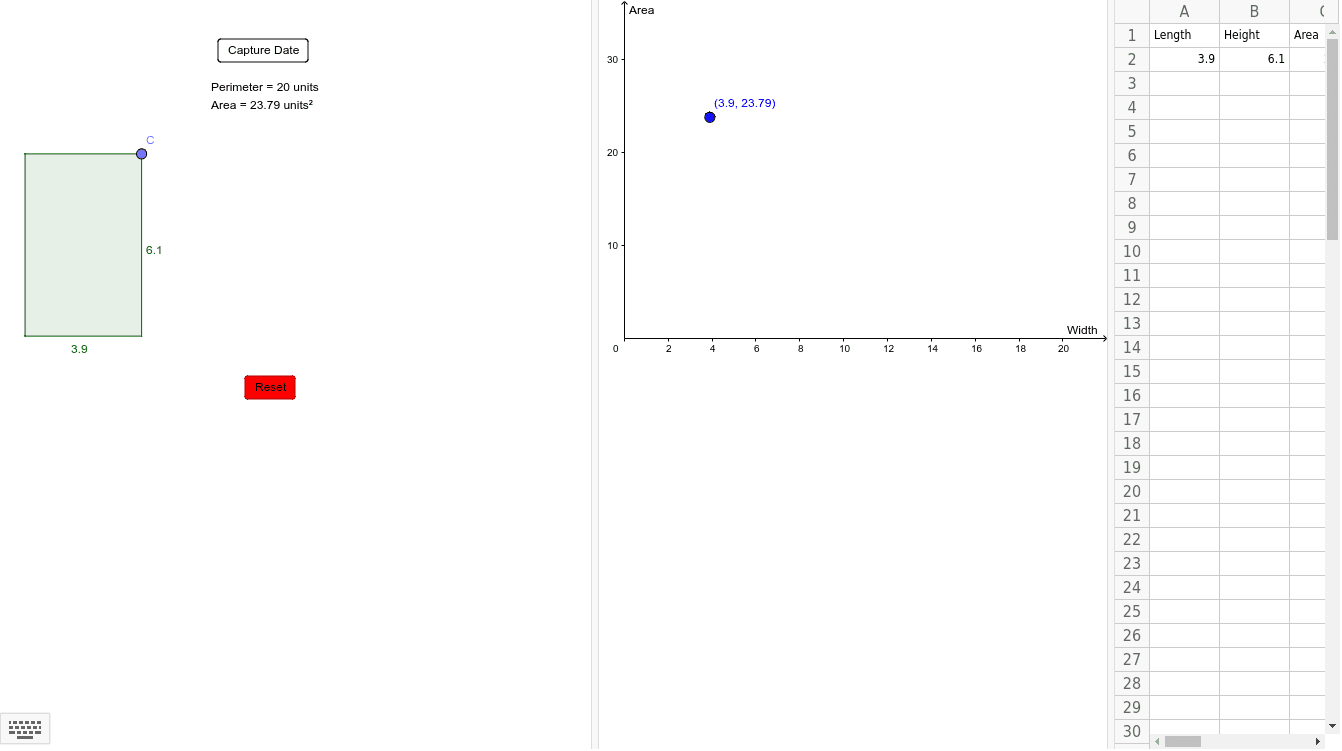
This example demonstrates how to explore the area of a rectangle as its length varies while keeping the perimeter fixed, and identifies the rectangle with the maximum area. Key math concepts include perimeter, area, derivatives, and optimization. Construction highlights involve using GeoGebra commands like Point, Segment, Polygon, Perimeter, and PointIn to build the rectangle, and sliders to dynamically adjust its dimensions and observe area changes. Suitable for high school students learning calculus and optimization problems.
GeoGebra Commands & Parameters
Point(yAxis) → APoint(xAxis) → BSegment(A, B) → fPoint(f) → CPolygon((0, 0), (x(C), 0), C, (0, y(C))) → poly1, g, h, c, iPerimeter(poly1) → perimeterpoly1PointIn(poly1) → Pointpoly1_1PointIn(poly1) → Pointpoly1
AI Drawing Prompt Reference
Draw a rectangle with a fixed perimeter of 20, where the length varies from 0 to 10, and observe how the area changes. Use a slider to adjust the length and width of the rectangle and find the maximum area.
The prompt above was compiled from the original drawing commands and is for reference only.