
Rectangle Area Formula Investigation
Loading the math board and drawing, please wait…
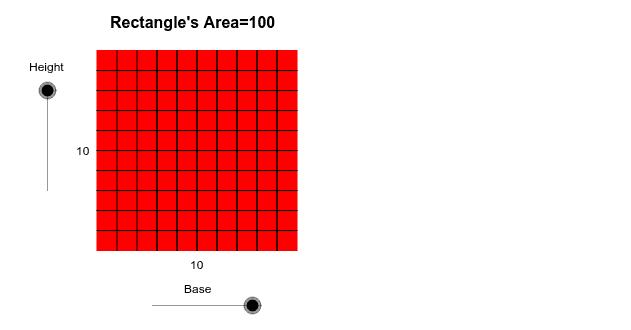
This example demonstrates how to explore the area formula for rectangles through dynamic geometry. It involves core math concepts like the area of geometric shapes, the relationship between length and width in rectangles, and the derivation of mathematical formulas. The construction uses GeoGebra commands/objects such as Point, Segment, Circle, OrthogonalLine, Intersect, Polygon, and Midpoint. Suitable for middle school students and above for learning geometric area formulas or as a teaching demonstration tool.
GeoGebra Commands & Parameters
Point(Circle[A, Base]) → BSegment(A, B) → bPoint(Circle[A, Height]) → CSegment(A, C) → dCircle(A, C) → eOrthogonalLine(A, b) → fIntersect(e, f, 1) → DOrthogonalLine(B, b) → gOrthogonalLine(D, f) → hIntersect(g, h) → EPolygon(A, D, E, B) → P, a_1, d_1, e_1, b_1Midpoint(A, D) → FMidpoint(A, B) → GPoint(Circle[A, 1]) → HSegment(A, H) → iPoint(Circle[A, 2]) → ISegment(A, I) → jPoint(Circle[A, 3]) → JSegment(A, J) → kPoint(Circle[A, 4]) → KSegment(A, K) → lPoint(Circle[A, 5]) → LSegment(A, L) → mPoint(Circle[A, 6]) → MSegment(A, M) → nPoint(Circle[A, 7]) → NSegment(A, N) → pPoint(Circle[A, 8]) → OSegment(A, O) → qPoint(Circle[A, 9]) → QSegment(A, Q) → rCircle(A, H) → sCircle(A, I) → tCircle(A, J) → c_1Circle(A, K) → f_1Circle(A, L) → g_1Circle(A, M) → h_1Circle(A, N) → k_1Circle(A, O) → p_1Circle(A, Q) → q_1Intersect(s, a_1, 1) → RIntersect(t, a_1, 1) → SIntersect(c_1, a_1, 1) → TIntersect(f_1, a_1, 1) → UIntersect(g_1, a_1, 1) → VIntersect(h_1, a_1, 1) → WIntersect(k_1, a_1, 1) → YIntersect(p_1, a_1, 1) → ZIntersect(q_1, a_1, 1) → A_1Intersect(q_1, b_1, 1) → B_1Intersect(p_1, b_1, 1) → C_1Intersect(k_1, b_1, 1) → D_1Intersect(h_1, b_1, 1) → E_1Intersect(g_1, b_1, 1) → F_1Intersect(f_1, b_1, 1) → G_1Intersect(c_1, b_1, 1) → H_1Intersect(t, b_1) → I_1,Intersect(s, b_1, 1) → J_1OrthogonalLine(R, a_1) → i_1OrthogonalLine(S, a_1) → j_1OrthogonalLine(T, a_1) → l_1OrthogonalLine(U, a_1) → m_1OrthogonalLine(V, a_1) → n_1OrthogonalLine(W, a_1) → r_1OrthogonalLine(Y, a_1) → s_1OrthogonalLine(Z, a_1) → t_1OrthogonalLine(A_1, a_1) → a_2OrthogonalLine(J_1, b_1) → b_2OrthogonalLine(I_1, b_1) → c_2OrthogonalLine(H_1, b_1) → d_2OrthogonalLine(G_1, b_1) → e_2OrthogonalLine(F_1, b_1) → f_2OrthogonalLine(E_1, b_1) → g_2OrthogonalLine(D_1, b_1) → h_2OrthogonalLine(C_1, b_1) → i_2OrthogonalLine(B_1, b_1) → j_2Intersect(b_2, d_1) → K_1Intersect(c_2, d_1) → L_1Intersect(d_2, d_1) → M_1Intersect(e_2, d_1) → N_1Intersect(f_2, d_1) → O_1Intersect(g_2, d_1) → P_1Intersect(h_2, d_1) → Q_1Intersect(i_2, d_1) → R_1Intersect(j_2, d_1) → S_1Intersect(a_2, e_1) → T_1Intersect(t_1, e_1) → U_1Intersect(s_1, e_1) → V_1Intersect(r_1, e_1) → W_1Intersect(n_1, e_1) → Y_1Intersect(m_1, e_1) → Z_1Intersect(l_1, e_1) → A_2Intersect(j_1, e_1) → B_2Intersect(i_1, e_1) → C_2Segment(J_1, K_1) → k_2Segment(I_1, L_1) → l_2Segment(H_1, M_1) → m_2Segment(G_1, N_1) → n_2Segment(F_1, O_1) → p_2Segment(E_1, P_1) → q_2Segment(D_1, Q_1) → r_2Segment(C_1, R_1) → s_2Segment(B_1, S_1) → t_2Segment(R, C_2) → a_3Segment(B_2, S) → b_3Segment(T, A_2) → c_3Segment(Z_1, U) → d_3Segment(V, Y_1) → e_3Segment(W_1, W) → f_3Segment(Y, V_1) → g_3Segment(U_1, Z) → h_3Segment(A_1, T_1) → i_3Intersect(q_1, a_1) → D_2, D_4Intersect(p_1, a_1) → E_2, E_4Intersect(k_1, a_1) → F_2, F_4Intersect(h_1, a_1) → G_2, G_4Intersect(g_1, a_1) → H_2, H_4Intersect(f_1, a_1) → I_2, I_4Intersect(c_1, a_1) → J_2, J_4Intersect(t, a_1) → K_2, K_3Intersect(c_1, b_1) → L_2, L_3Intersect(f_1, b_1) → M_2, M_3Intersect(g_1, b_1) → N_2, N_3Intersect(h_1, b_1) → O_2, O_3Intersect(k_1, b_1) → P_2, P_3Intersect(q_1, b_1) → Q_2, Q_3Intersect(p_1, b_1) → R_2, R_3OrthogonalLine(D_2, a_1) → aOrthogonalLine(E_2, a_1) → cOrthogonalLine(F_2, a_1) → j_3OrthogonalLine(G_2, a_1) → k_3OrthogonalLine(H_2, a_1) → l_3OrthogonalLine(I_2, a_1) → m_3OrthogonalLine(J_2, a_1) → n_3OrthogonalLine(K_2, a_1) → p_3OrthogonalLine(L_2, b_1) → q_3OrthogonalLine(M_2, b_1) → r_3OrthogonalLine(N_2, b_1) → s_3OrthogonalLine(O_2, b_1) → t_3OrthogonalLine(P_2, b_1) → a_4OrthogonalLine(R_2, b_1) → b_4OrthogonalLine(Q_2, b_1) → c_4Intersect(q_3, d_1) → U_2Intersect(r_3, d_1) → V_2Intersect(s_3, d_1) → W_2Intersect(t_3, d_1) → Y_2Intersect(a_4, d_1) → Z_2Intersect(b_4, d_1) → A_3Intersect(c_4, d_1) → B_3Intersect(e_1, a) → C_3Intersect(e_1, c) → D_3Intersect(e_1, j_3) → E_3Intersect(e_1, k_3) → F_3Intersect(e_1, l_3) → G_3Intersect(e_1, m_3) → H_3Intersect(e_1, n_3) → I_3Intersect(p_3, e_1) → J_3Segment(U_2, L_2) → d_4Segment(M_2, V_2) → e_4Segment(W_2, N_2) → f_4Segment(O_2, Y_2) → g_4Segment(Z_2, P_2) → h_4Segment(R_2, A_3) → i_4Segment(B_3, Q_2) → j_4Segment(J_3, K_2) → k_4Segment(J_2, I_3) → l_4Segment(H_3, I_2) → m_4Segment(H_2, G_3) → n_4Segment(F_3, G_2) → p_4Segment(F_2, E_3) → q_4Segment(D_3, E_2) → r_4Segment(D_2, C_3) → s_4
AI Drawing Prompt Reference
Draw a rectangle to explore its area formula dynamically. Start by drawing one side of the rectangle and a perpendicular line as the height. Use circles and perpendicular lines to find the vertices of the rectangle, completing its outline. Then, draw several concentric circles inside the rectangle and calculate their intersections with the sides. Finally, connect these intersection points to form multiple small rectangles, visually demonstrating the derivation of the area formula.
The prompt above was compiled from the original drawing commands and is for reference only.