
Recta with an Explicit Line Equation: GeoGebra Demo
Loading the math board and drawing, please wait…
In collections
geometriadinamica.es
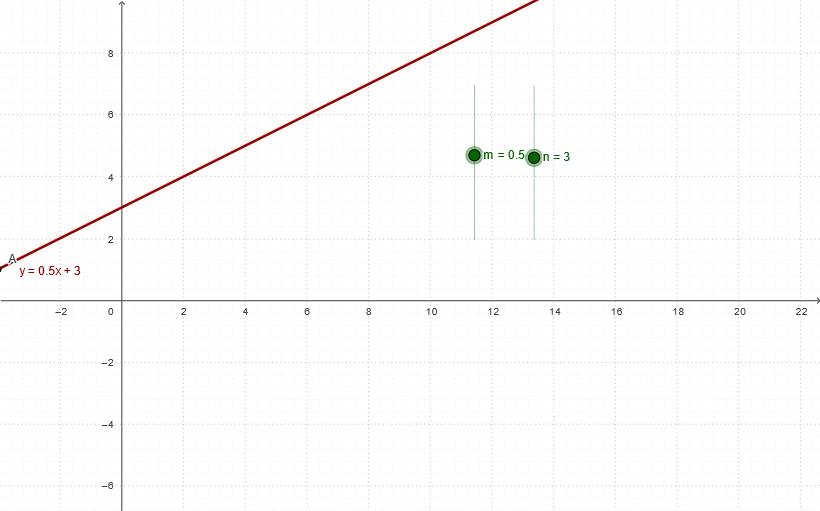
This example demonstrates how to construct and visualize a line in GeoGebra using an explicit equation (typically y = m x + n). It focuses on the geometric meaning of the parameters: slope m and y-intercept n, and how they form a function f whose graph becomes the line. Construction uses the objects listed in the “construction summary”: m, n, f, T1, T3, T4, and A—where m and n define the explicit formula, f represents the function/relationship, and T1/T3/T4 together with point A provide the graphical elements (the line and key reference markers) needed to render and interpret the equation visually. Suitable for secondary school through early college students studying coordinate geometry and function graphs, especially for linking algebraic expressions with their plotted shapes.
GeoGebra Commands & Parameters
Numeric m(0.500000000000001)Numeric n(3)y = (m * x) + n(-4, (-4 * m) + n)
AI Drawing Prompt Reference
Draw a straight line with the equation y = 0.5x + 3. The line includes points such as (-4, 2.5), the y-intercept at (0, 3), and the x-intercept at (-6, 0). These points help visualize the slope and intercept of the line. The line should be drawn clearly to show its shape and key features.
The prompt above was compiled from the original drawing commands and is for reference only.