
“Rechenschlange” Volume Unit Conversion Practice
Loading the math board and drawing, please wait…
In collections
Wiederholung: Flächen- und Raummaße
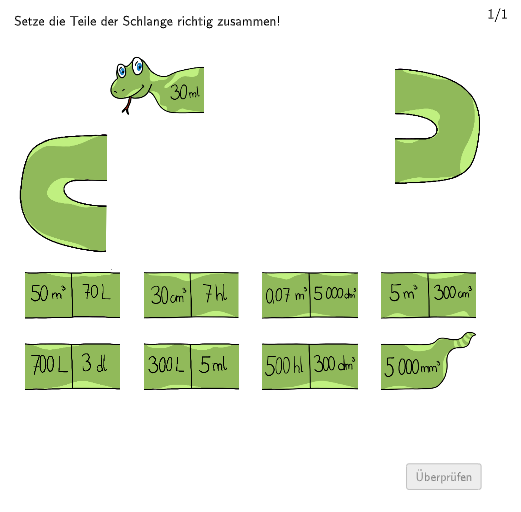
This GeoGebra example uses a “Rechenschlange” style construction—visual step-by-step segments—to help students practice converting volume (space measure) units. It demonstrates how the same quantity can be represented in different unit systems and guides learners to establish correct equivalences using a structured, inspectable geometric layout. Key math concepts include volume measurement, unit conversion, and consistent quantity transformation (respecting magnitude/units). In the construction, the core building blocks are created with Segment, Polygon, and Textfield to represent lengths/parts and to label values and units; Shuffle and Element are used to generate or vary exercise parameters; and Append collects generated elements/results into a running sequence of steps. The model is designed for primary grades (roughly 5–6) and is suitable for classroom instruction, guided practice, or interactive homework on measurement and volume conversions.
GeoGebra Commands & Parameters
Segment(K_1, E_1) → jSegment(B_1, C_1) → gTextfield(aInput) → InputBox1Textfield(bInput) → InputBox2Segment(Csol, A_1) → fSegment(C_1, Esol) → hSegment(E_1, Gsol) → iSegment(L_1, Msol) → lSegment(Isol, J_1) → kSegment(Ksol, P_1) → mSegment(Osol, U_1) → nSegment(Qsol, S_1) → pPolygon(PtopLeftCornerFeedback, PtopRightCornerFeedback, PbottomRightCornerFeedback, PbottomLeftCornerFeedback) → rectangleCorrect, ptopleftcornerfeedback, ptoprightcornerfeedback, pbottomrightcornerfeedback, pbottomleftcornerfeedbackShuffle(Sequence[Random[0, 10], i, 1, 100]) → randomNosForX, {2, 7, 0, 5, 10, 2, 7, 9, 8, 5, 10, 2, 2, 9, 1, 8, 2, 6, 8, 8, 1, 4, 3, 1, 6, 7, 1, 2, 10, 7, 3, 5, 1, 6, 0, 0, 5, 4, 0, 6, 0, 4, 2, 3, 8, 4, 5, 4, 2, 4, 7, 5, 3, 5, 4, 0, 4, 8, 6, 6, 2, 5, 8, 5, 9, 8, 1, 3, 0, 8, 7, 5, 10, 2, 1, 10, 6, 4, 0, 0, 5, 5, 10, 9, 4, 1, 7, 10, 5, 8, 9, 7, 1, 3, 8, 10, 2, 9, 5, 10}Element(randomNosForX, Mod[questionCount, 100] + 1) → numXShuffle(Sequence[Random[0, 10], i, 1, 100]) → randomNosForY, {5, 2, 4, 5, 9, 4, 9, 4, 7, 6, 2, 5, 7, 4, 1, 4, 5, 1, 10, 2, 10, 5, 0, 1, 1, 7, 2, 8, 0, 1, 10, 8, 4, 5, 4, 3, 2, 4, 0, 1, 7, 1, 3, 10, 3, 4, 3, 1, 1, 7, 0, 1, 3, 9, 2, 0, 5, 3, 1, 10, 6, 5, 9, 2, 6, 10, 7, 5, 7, 0, 4, 0, 10, 5, 1, 2, 3, 7, 9, 1, 9, 4, 6, 2, 7, 2, 5, 4, 3, 10, 1, 5, 1, 7, 3, 9, 10, 3, 7, 3}Element(randomNosForY, Mod[questionCount, 100] + 1) → numYAppend(true, Sequence[If[randomNosForX(i) ≟ randomNosForX(i - 1), false, true], i, 2, 100]) → stayX
AI Drawing Prompt Reference
Draw a geometric figure for volume unit conversion practice, including multiple segments and labels representing different unit conversions. Start by drawing two points and connecting them with a segment. Then input two numbers to represent the start and end of the conversion. Use these numbers to draw a series of segments, each representing a step in the unit conversion. Finally, use these segments and numbers to construct a rectangle, representing the correct conversion result.
The prompt above was compiled from the original drawing commands and is for reference only.