
Reasoning to Find Area
Loading the math board and drawing, please wait…
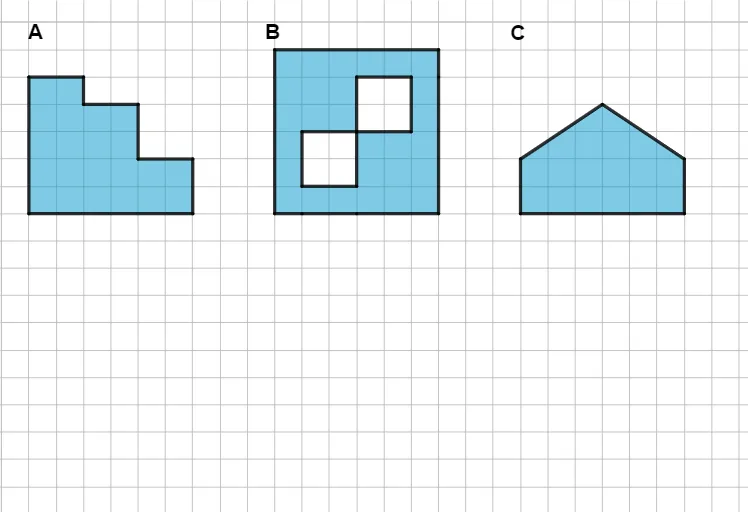
This example demonstrates how to find area through geometric reasoning. Key mathematical concepts include polygons and area calculation. It uses commands like Segment, Polygon, CustomOctagon, Point, etc. Suitable for middle school and above students to learn geometric construction and area calculation.
GeoGebra Commands & Parameters
Segment(A, B) → fSegment(B, C) → gSegment(C, A) → hPolygon(A, C, B) → t1, b, a, cSegment(D, E) → iSegment(E, F) → jSegment(F, G) → kSegment(G, D) → lPolygon(D, E, F, G) → q1, d, e, f_1, g_1Segment(H, I) → mSegment(I, J) → nSegment(J, K) → pSegment(K, L) → qSegment(L, H) → rPolygon(H, I, J, K, L) → poly1, h_1, i_1, j_1, k_1, l_1Segment(M, N) → sSegment(N, O) → tSegment(O, P) → m_1Segment(P, Q) → n_1Segment(Q, R) → p_1Segment(R, M) → q_1Polygon(R, M, N, O, P, Q) → poly2, r_1, m_2, n_2, o, p_2, q_2Segment(S, T) → s_1Segment(T, U) → t_1Segment(U, V) → a_1Segment(V, W) → b_1Segment(W, Z) → c_1Segment(Z, A_1) → d_1Segment(A_1, S) → e_1Polygon(S, T, U, V, W, Z, A_1) → poly3, s_2, t_2, u, v, w, z_1, f_2Segment(B_1, C_1) → g_2Segment(C_1, D_1) → h_2Segment(D_1, E_1) → i_2Segment(E_1, F_1) → j_2Segment(F_1, G_1) → k_2Segment(G_1, H_1) → l_2Segment(H_1, I_1) → r_2Segment(I_1, B_1) → a_2Polygon(B_1, C_1, D_1, E_1, F_1, G_1, H_1, I_1) → poly4, b_2, c_2, d_2, e_2, f_3, g_3, h_3, i_3Segment(J_1, K_1) → j_3Segment(K_1, L_1) → k_3Segment(L_1, M_1) → l_3Segment(M_1, N_1) → m_3Segment(N_1, O_1) → n_3Segment(O_1, P_1) → p_3Segment(P_1, Q_1) → q_3Segment(Q_1, R_1) → r_3Segment(R_1, J_1) → s_3Polygon(R_1, J_1, K_1, L_1, M_1, N_1, O_1, P_1, Q_1) → poly5, t_3, a_3, b_3, c_3, d_3, e_3, o_1, f_4, g_4Segment(S_1, T_1) → h_4Segment(T_1, U_1) → i_4Segment(U_1, V_1) → j_4Segment(V_1, W_1) → k_4Segment(W_1, Z_1) → l_4Segment(Z_1, A_2) → m_4Segment(A_2, B_2) → n_4Segment(B_2, C_2) → p_4Segment(C_2, D_2) → q_4Segment(D_2, S_1) → r_4Polygon(S_1, T_1, U_1, V_1, W_1, Z_1, A_2, B_2, C_2, D_2) → poly6, s_4, e_4, t_4, u_1, v_1, w_1, a_4, b_4, c_4, d_4CustomOctagon(E_2, F_2, G_2, H_2, I_2, J_2, K_2, L_2) → poly7, f_5, g_5, h_5, i_5, j_5, k_5, l_5, m_5CustomOctagon(M_2, N_2, O_2, P_2, Q_2, R_2, S_2, T_2) → poly8, n_5, p_5, q_5, r_5, s_5, t_5, a_5, b_5Point(t_5) → V_2Point(n_5) → A_3CustomNonagon(U_2, P_2, V_2, W_2, R_2, Z_2, A_3, T_2, B_3) → c_5, d_5, e_5, f_6, g_6, h_6, i_6, j_6, k_6, poly9CustomPentagon(C_3, D_3, E_3, F_3, G_3) → l_6, m_6, n_6, p_6, q_6, poly10Point(b_5) → H_3Point(j_6) → I_3Segment(H_3, I_3) → r_6Point(a_5) → J_3Point(g_6) → K_3Segment(J_3, K_3) → s_6
AI Drawing Prompt Reference
Draw a geometric figure composed of multiple polygons, including a triangle, a quadrilateral, a pentagon, a hexagon, and an octagon. These polygons are connected by line segments, forming a complex combined shape. Start with the triangle, then sequentially add the quadrilateral, pentagon, hexagon, and octagon, with each polygon connected to others by line segments, ultimately forming a continuous geometric structure.
The prompt above was compiled from the original drawing commands and is for reference only.