
Reading Fractions from the Number Line
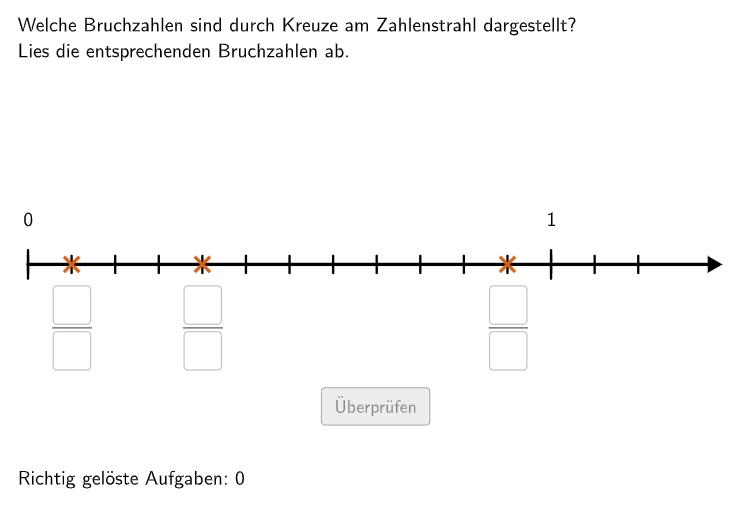
Loading the math board and drawing, please wait…
In collections
Zahlenstrahl und Ordnen von Brüchen
This is an interactive fraction practice using a dynamic number line to help students understand fractions as relative positions. The core math concepts include: numerators and denominators, representing fractions on a number line, and comparing fraction sizes. The construction uses GeoGebra commands: Textfield for student input, If and Element for randomly generating fraction problems with different denominators, Sequence and Segment for drawing the number line with markers, Polygon and Union for UI enhancement. It features a validate button (btnValidate) and try-again button (btnTryAgain) for instant feedback on correct answers. Designed for Grade 5-6 students, focusing on developing number sense and fraction operation skills.
GeoGebra Commands & Parameters
Shuffle(Sequence[i, i, 2, 12]) → NennerListe, {12, 6, 7, 5, 4, 8, 11, 3, 10, 2, 9}If(nenner ≟ 2, 5, If[nenner ≟ 3 ∨ nenner ≟ 4, 4, If[nenner ∈ {5, 6, 7}, 2, If[nenner ≟ 8 ∨ nenner ≟ 9, 1.5, 1.1]]]) → maxstrahlgrenzeIf(nenner ∈ {2, 3, 4}, 2, 1) → minstrahlgrenzeIf(nenner ∈ {2, 3, 4, 5, 6, 7}, Random[minstrahlgrenze, maxstrahlgrenze], If[nenner ≟ 8 ∨ nenner ≟ 9, 1.5, If[nenner ≟ 10 ∨ nenner ≟ 11 ∨ nenner ≟ 12, 1.2]]) → maxganzeShuffle(Sequence[i, i, 1, (nenner * maxganze)]) → ZaehlerListe1, {11, 4, 1, 8, 6, 7, 3, 10, 5, 12, 9, 2, 13, 14}Textfield(input1) → InputBox1Textfield(input2) → InputBox2Polygon(PtopLeftCornerFeedback, PtopRightCornerFeedback, PbottomRightCornerFeedback, PbottomLeftCornerFeedback) → rectangleCorrect, ptopleftcornerfeedback, ptoprightcornerfeedback, pbottomrightcornerfeedback, pbottomleftcornerfeedbackShuffle(Sequence[Random[0, 10], i, 1, 100]) → randomNosQuestion, {3, 3, 0, 10, 1, 6, 8, 10, 8, 0, 4, 10, 0, 3, 0, 9, 0, 10, 6, 0, 10, 10, 8, 10, 3, 7, 1, 0, 1, 2, 8, 5, 0, 3, 10, 4, 1, 5, 3, 6, 1, 6, 1, 8, 2, 10, 4, 0, 6, 5, 4, 10, 2, 4, 9, 6, 10, 5, 7, 3, 3, 9, 7, 0, 7, 9, 8, 4, 4, 9, 4, 1, 5, 6, 0, 8, 1, 8, 0, 10, 3, 10, 9, 0, 2, 2, 6, 6, 2, 3, 0, 9, 1, 5, 0, 9, 7, 3, 0, 3}Element(randomNosQuestion, Mod[questionCount, 100] + 1) → questionNumUnion(Sequence[StrahlEndPL + (unterteilungsvektor * i), i, 0, unterteilungen], Sequence[(0, (-1 * i)), i, 1, 15]) → UnterteilungenPunkteSequence(Element[UnterteilungenPunkte, 1 + (nenner * i)], i, 0, maxganze + 5) → GanzePunkteSegment(StrahlEndPL, StrahlEndPInf) → ZahlenStrahlTextfield(input3) → InputBox3Textfield(input4) → InputBox4Textfield(input5) → InputBox5Textfield(input6) → InputBox6Polygon(VR1E1, VR1E2, VR1E3, VR1E4) → VR1, vr1e1, vr1e2, vr1e3, vr1e4Polygon(VR2E1, VR2E2, VR2E3, VR2E4) → VR2, vr2e1, vr2e2, vr2e3, vr2e4Polygon(VR3E1, VR3E2, VR3E3, VR3E4) → VR3, vr3e1, vr3e2, vr3e3, vr3e4Distance(Corner[SolText1, 1], Corner[SolText1, 2]) → BreiteSolText1Distance(Corner[SolText2, 1], Corner[SolText2, 2]) → BreiteSolText2Distance(Corner[SolText3, 1], Corner[SolText3, 2]) → BreiteSolText3Sequence(Segment[UnterteilungenPunkte(i) + (0, 0.15), UnterteilungenPunkte(i) + (0, -0.15)], i, 1, Length[UnterteilungenPunkte]) → UnterteilungenStreckenSort({zaehler1, zaehler2, zaehler3}) → SolZaehlerListText(Text9, A, false, true, 0) → Text11Text(Text12, Bruch1Punkt + (0.05, -1.8), false, true, 0) → Text13Segment(Bruch2Punkt + (0, 1.6), Bruch2Punkt + (0, If[IsInteger[zaehler2 / nenner], 1.1, 0.5])) → SolStrecke2Segment(Bruch3Punkt + (0, 1.6), Bruch3Punkt + (0, If[IsInteger[zaehler3 / nenner], 1.1, 0.5])) → SolStrecke3Segment(Bruch1Punkt + (0, 1.6), Bruch1Punkt + (0, If[IsInteger[zaehler1 / nenner], 1.1, 0.5])) → SolStrecke1Sequence(Segment[GanzePunkte(i) + (0, 0.25), GanzePunkte(i) + (0, -0.25)], i, 1, 6) → GanzeUnterteilungen
AI Drawing Prompt Reference
Draw a dynamic number line with randomly marked positions for fractions with different denominators. The number line will randomly show two fractions, and you need to input their positions. It will also randomly display an integer marker, and you need to input this integer. Some fraction markers will be randomly shown, and you need to input their positions.
The prompt above was compiled from the original drawing commands and is for reference only.