
Radians in Unit Circle by Werner Pries
Loading the math board and drawing, please wait…
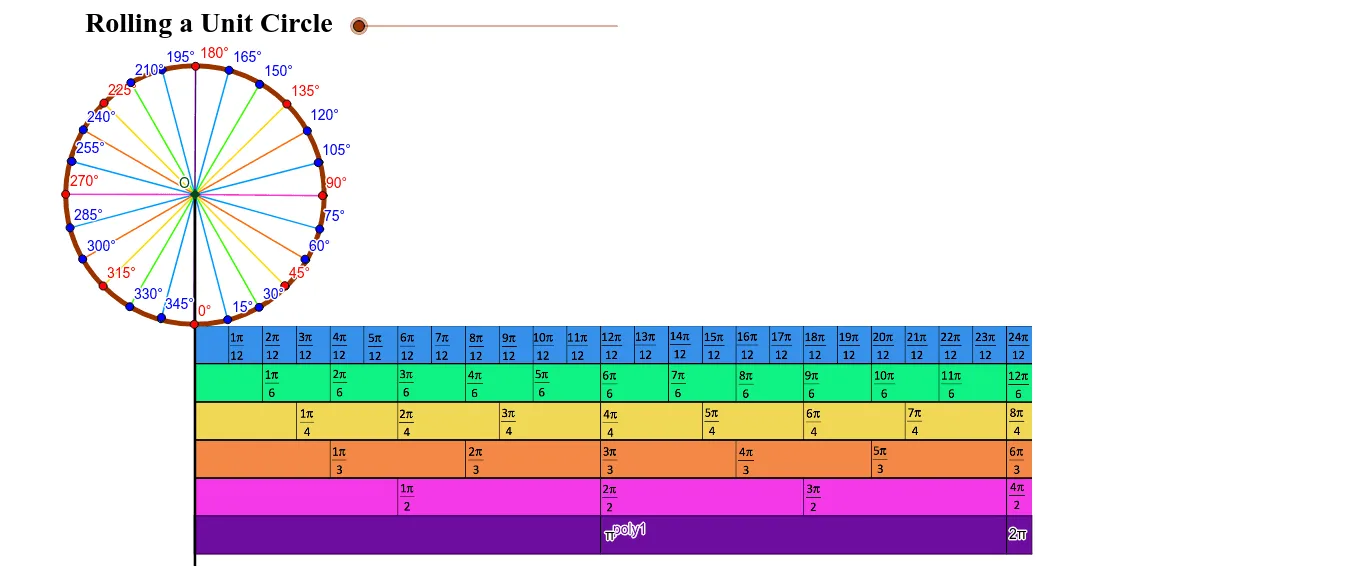
This example demonstrates the concept of radians in the unit circle. Key mathematical concepts include radian measure and trigonometric functions. Using GeoGebra commands such as Line, Circle, Intersect, Segment, Rotate, etc., the example constructs arcs and corresponding trigonometric values on the unit circle. Suitable for high school mathematics education and learning.
GeoGebra Commands & Parameters
Line(A, B) → aLine(C, D) → bCircle(E, 2) → cOrthogonalLine(E, a) → dIntersect(d, a) → FSegment(A, F) → eRotate(F, (-(180 * e / 6.28))°, E) → F'Angle(F', E, F) → αCircleArc(E, F, F') → fVector(E, F') → uRotate(F', 3.141592653589793, E) → F''_1Vector(P, Q) → vTranslate(Q, v) → Q'Vector(Q, Q') → wTranslate(Q', w) → Q''Translate(Q'', w) → Q'''Translate(Q''', w) → RTranslate(R, w) → R'Vector(Q', Q'') → zVector(Q'', Q''') → mVector(Q''', R) → nVector(R, R') → pVector(P, R') → qRotate(F', 0.7853981633974483, E) → F''Angle(F', E, F'') → βRotate(F', 0.2617993877991494, E) → F''_2Angle(F', E, F''_2) → γRotate(F', 0.5235987755982988, E) → F''_3Angle(F', E, F''_3) → δRotate(F', 1.0471975511965976, E) → F''_4Angle(F', E, F''_4) → εRotate(F', 1.3089969389957472, E) → F''_5Angle(F', E, F''_5) → ζRotate(F', 1.5707963267948966, E) → F''_6Angle(F', E, F''_6) → ηRotate(F', 1.8325957145940461, E) → F''_7Angle(F', E, F''_7) → θRotate(F', 2.0943951023931953, E) → F''_8Angle(F', E, F''_8) → ιRotate(F''_8, 0.2617993877991494, E) → UAngle(F''_8, E, U) → κRotate(U, 0.2617993877991494, E) → U'Angle(U, E, U') → λRotate(U', 0.2617993877991494, E) → U''Angle(U', E, U'') → μRotate(U'', 0.2617993877991494, E) → U'''Angle(U'', E, U''') → νRotate(U''', 0.2617993877991494, E) → VAngle(U''', E, V) → ξRotate(V, 0.2617993877991494, E) → V'Angle(V, E, V') → οRotate(V', 0.2617993877991494, E) → V''Angle(V', E, V'') → ρRotate(V'', 0.2617993877991494, E) → V'''Angle(V'', E, V''') → σRotate(V''', 0.2617993877991494, E) → WAngle(V''', E, W) → τRotate(W, 0.2617993877991494, E) → W'Angle(W, E, W') → υRotate(W', 0.2617993877991494, E) → W''Angle(W', E, W'') → ϕRotate(W'', 0.2617993877991494, E) → W'''Angle(W'', E, W''') → χRotate(W''', 0.2617993877991494, E) → ZAngle(W''', E, Z) → ψRotate(Z, 0.2617993877991494, E) → Z'Angle(Z, E, Z') → ωRotate(Z', 0.2617993877991494, E) → Z''Angle(Z', E, Z'') → α_1Mirror(A_1, J) → B_1Line(B_1, a) → gOrthogonalLine(T, g) → hIntersect(g, h) → C_1Segment(J, B_1) → iSegment(B_1, C_1) → jSegment(C_1, T) → kSegment(T, J) → lPoint(l) → D_1OrthogonalLine(D_1, j) → rIntersect(j, r) → E_1Segment(D_1, E_1) → sOrthogonalLine(G, a) → tIntersect(t, j) → F_1Intersect(t, l) → G_1Segment(F_1, G_1) → a_1Polygon(B_1, J, T, C_1) → poly1, b_1, j_1, t_1, c_1OrthogonalLine(E, a) → d_1Point(d_1) → H_1Segment(H_1, F''_2) → e_1Segment(H_1, F''_3) → f_1Segment(H_1, F'') → g_1Segment(H_1, F''_4) → h_1Segment(H_1, F''_5) → i_1Segment(H_1, F''_6) → k_1Segment(H_1, F''_7) → l_1Segment(H_1, F''_8) → m_1Segment(H_1, U) → n_1Segment(H_1, U') → p_1Segment(H_1, U'') → q_1Point(d_1) → I_1Segment(H_1, I_1) → r_1Segment(H_1, V) → s_1Segment(H_1, V') → a_2Segment(H_1, V'') → b_2Segment(H_1, V''') → c_2Segment(H_1, W) → d_2Segment(H_1, W') → e_2Segment(H_1, W'') → f_2Segment(H_1, W''') → g_2Segment(H_1, Z) → h_2Segment(H_1, Z') → i_2Segment(H_1, Z'') → j_2Point(d_1) → J_1Ray(H_1, J_1) → k_2Point(k_2) → K_1Segment(H_1, K_1) → l_2Segment(F', H_1) → m_2Segment(H_1, U''') → n_2Ray(H_1, K_1) → p_2Intersect(e_1, f_1) → OPoint(m_2) → L_1Point(k_1) → M_1Point(n_2) → N_1Point(e_2) → P_1Point(g_1) → Q_1Point(n_1) → R_1Point(b_2) → S_1Point(h_2) → T_1Point(e_1) → U_1Point(f_1) → V_1Point(h_1) → W_1Point(i_1) → Z_1Point(l_1) → A_2Point(m_1) → B_2Point(p_1) → C_2Point(q_1) → D_2Point(s_1) → E_2Point(c_2) → F_2Point(d_2) → G_2Point(f_2) → H_2Point(g_2) → I_2Point(i_2) → J_2Point(j_2) → K_2Point(a_2) → L_2
AI Drawing Prompt Reference
Draw a unit circle and mark angles in radians. Start by drawing diameters AB and CD, then draw a unit circle c with center E. Draw the perpendicular line d to diameter AB, find the intersection point F, and connect E and F to form segment e. Rotate F around E by approximately -100 degrees to get F', and draw arc f. Continue rotating F' around E by different radian values to draw multiple arcs.
The prompt above was compiled from the original drawing commands and is for reference only.