
Radians in the Unit Circle by Vladimir Ortega Garcia
Loading the math board and drawing, please wait…
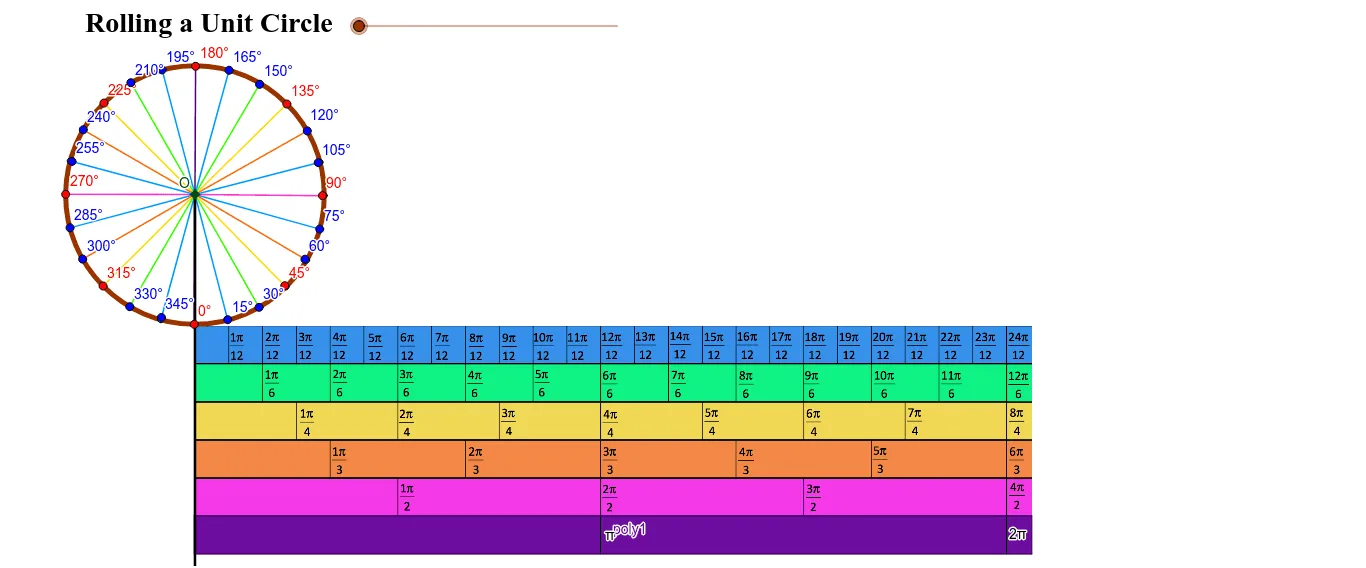
This interactive example provides a visual demonstration of radians within the unit circle, illustrating the fundamental relationship between the central angle and the corresponding arc length. The core mathematical concepts include radian measure, the constant $\pi$, and the geometric definition of angles. The construction utilizes GeoGebra commands such as Circle, CircleArc, Rotate, Angle, and Vector to create a dynamic system of points and segments that trace the unit circle. It is designed for high school or early college students studying trigonometry and geometry, serving as an effective tool for conceptualizing how radians are derived from the unit circle's properties.
GeoGebra Commands & Parameters
Line(A, B) → aLine(C, D) → bCircle(E, 2) → cOrthogonalLine(E, a) → dIntersect(d, a) → FSegment(A, F) → eRotate(F, (-(180 * e / 6.28))°, E) → F'Angle(F', E, F) → αCircleArc(E, F, F') → fVector(E, F') → uRotate(F', 3.141592653589793, E) → F''_1Vector(P, Q) → vTranslate(Q, v) → Q'Vector(Q, Q') → wTranslate(Q', w) → Q''Translate(Q'', w) → Q'''Translate(Q''', w) → RTranslate(R, w) → R'Vector(Q', Q'') → zVector(Q'', Q''') → mVector(Q''', R) → nVector(R, R') → pVector(P, R') → qRotate(F', 0.7853981633974483, E) → F''Angle(F', E, F'') → βRotate(F', 0.2617993877991494, E) → F''_2Angle(F', E, F''_2) → γRotate(F', 0.5235987755982988, E) → F''_3Angle(F', E, F''_3) → δRotate(F', 1.0471975511965976, E) → F''_4Angle(F', E, F''_4) → εRotate(F', 1.3089969389957472, E) → F''_5Angle(F', E, F''_5) → ζRotate(F', 1.5707963267948966, E) → F''_6Angle(F', E, F''_6) → ηRotate(F', 1.8325957145940461, E) → F''_7Angle(F', E, F''_7) → θRotate(F', 2.0943951023931953, E) → F''_8Angle(F', E, F''_8) → ιRotate(F''_8, 0.2617993877991494, E) → UAngle(F''_8, E, U) → κRotate(U, 0.2617993877991494, E) → U'Angle(U, E, U') → λRotate(U', 0.2617993877991494, E) → U''Angle(U', E, U'') → μRotate(U'', 0.2617993877991494, E) → U'''Angle(U'', E, U''') → νRotate(U''', 0.2617993877991494, E) → VAngle(U''', E, V) → ξRotate(V, 0.2617993877991494, E) → V'Angle(V, E, V') → οRotate(V', 0.2617993877991494, E) → V''Angle(V', E, V'') → ρRotate(V'', 0.2617993877991494, E) → V'''Angle(V'', E, V''') → σRotate(V''', 0.2617993877991494, E) → WAngle(V''', E, W) → τRotate(W, 0.2617993877991494, E) → W'Angle(W, E, W') → υRotate(W', 0.2617993877991494, E) → W''Angle(W', E, W'') → ϕRotate(W'', 0.2617993877991494, E) → W'''Angle(W'', E, W''') → χRotate(W''', 0.2617993877991494, E) → ZAngle(W''', E, Z) → ψRotate(Z, 0.2617993877991494, E) → Z'Angle(Z, E, Z') → ωRotate(Z', 0.2617993877991494, E) → Z''Angle(Z', E, Z'') → α_1Mirror(A_1, J) → B_1Line(B_1, a) → gOrthogonalLine(T, g) → hIntersect(g, h) → C_1Segment(J, B_1) → iSegment(B_1, C_1) → jSegment(C_1, T) → kSegment(T, J) → lPoint(l) → D_1OrthogonalLine(D_1, j) → rIntersect(j, r) → E_1Segment(D_1, E_1) → sOrthogonalLine(G, a) → tIntersect(t, j) → F_1Intersect(t, l) → G_1Segment(F_1, G_1) → a_1Polygon(B_1, J, T, C_1) → poly1, b_1, j_1, t_1, c_1OrthogonalLine(E, a) → d_1Point(d_1) → H_1Segment(H_1, F''_2) → e_1Segment(H_1, F''_3) → f_1Segment(H_1, F'') → g_1Segment(H_1, F''_4) → h_1Segment(H_1, F''_5) → i_1Segment(H_1, F''_6) → k_1Segment(H_1, F''_7) → l_1Segment(H_1, F''_8) → m_1Segment(H_1, U) → n_1Segment(H_1, U') → p_1Segment(H_1, U'') → q_1Point(d_1) → I_1Segment(H_1, I_1) → r_1Segment(H_1, V) → s_1Segment(H_1, V') → a_2Segment(H_1, V'') → b_2Segment(H_1, V''') → c_2Segment(H_1, W) → d_2Segment(H_1, W') → e_2Segment(H_1, W'') → f_2Segment(H_1, W''') → g_2Segment(H_1, Z) → h_2Segment(H_1, Z') → i_2Segment(H_1, Z'') → j_2Point(d_1) → J_1Ray(H_1, J_1) → k_2Point(k_2) → K_1Segment(H_1, K_1) → l_2Segment(F', H_1) → m_2Segment(H_1, U''') → n_2Ray(H_1, K_1) → p_2Intersect(e_1, f_1) → OPoint(m_2) → L_1Point(k_1) → M_1Point(n_2) → N_1Point(e_2) → P_1Point(g_1) → Q_1Point(n_1) → R_1Point(b_2) → S_1Point(h_2) → T_1Point(e_1) → U_1Point(f_1) → V_1Point(h_1) → W_1Point(i_1) → Z_1Point(l_1) → A_2Point(m_1) → B_2Point(p_1) → C_2Point(q_1) → D_2Point(s_1) → E_2Point(c_2) → F_2Point(d_2) → G_2Point(f_2) → H_2Point(g_2) → I_2Point(i_2) → J_2Point(j_2) → K_2Point(a_2) → L_2
AI Drawing Prompt Reference
Draw a unit circle and mark the arc lengths and angle values for several special angles (0, π/4, π/2, 3π/4, π, 5π/4, 3π/2, 7π/4, 2π). Start by drawing a circle with a radius of 2, then use rotation and angle measurement to mark these special angles and connect them with arcs.
The prompt above was compiled from the original drawing commands and is for reference only.