
Quadrilateral Properties Exploration
Loading the math board and drawing, please wait…
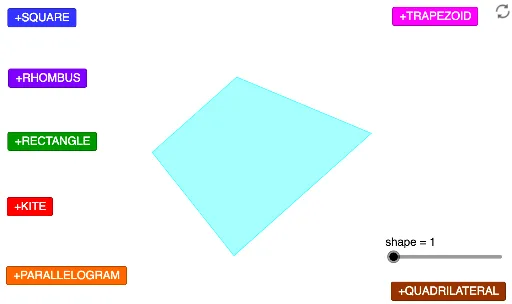
This applet demonstrates the geometric properties of various quadrilaterals (kite, parallelogram, square, trapezoid, etc.). It involves core concepts like diagonals, side lengths, angles, symmetry, and parallel lines. Construction uses commands such as Polygon, Point, Intersect, Mirror, OrthogonalLine, Circle, and sliders for dynamic property visualization. Suitable for middle school and above students for geometric intuition and property verification.
GeoGebra Commands & Parameters
Polygon(A, B, 4) → poly1, f, g, h, i, C, DPolygon(A_1, B_1, 4) → poly1_1, f_1, g_1, h_1, i_1, C_1, D_1Polygon(A_2, B_2, 4) → poly1_2, f_2, g_2, h_2, i_2, C_2, D_2Polygon(A_3, B_3, 4) → poly1_3, f_3, g_3, h_3, i_3, C_3, D_3Polygon(A_4, B_4, 4) → poly1_4, f_4, g_4, h_4, i_4, C_4, D_4Polygon(A_5, B_5, 4) → poly1_5, f_5, g_5, h_5, i_5, C_5, D_5Polygon(A_6, B_6, 4) → poly1_6, f_6, g_6, h_6, i_6, C_6, D_6Polygon(A_7, B_7, 4) → poly1_7, f_7, g_7, h_7, i_7, C_7, D_7Point(CircleArc[E, Rotate[F, -1°, E], Rotate[F, (-(179°)), E]]) → GIntersect(Circle[G, E], Circle[F, E]) → H, I, ,Polygon(E, F, I, G) → q1, e, f_8, i_8, g_8Point(CircleArc[E_1, Rotate[F_1, -1°, E_1], Rotate[F_1, (-(179°)), E_1]]) → G_1Intersect(Circle[G_1, E_1], Circle[F_1, E_1]) → H_1, I_1, ,Polygon(E_1, F_1, I_1, G_1) → q1_1, e_1, f_9, i_9, g_9Point(CircleArc[E_2, Rotate[F_2, -1°, E_2], Rotate[F_2, (-(179°)), E_2]]) → G_2Intersect(Circle[G_2, E_2], Circle[F_2, E_2]) → H_2, I_2, ,Polygon(E_2, F_2, I_2, G_2) → q1_2, e_2, f_{10}, i_{10}, g_{10}Point(CircleArc[E_3, Rotate[F_3, -1°, E_3], Rotate[F_3, (-(179°)), E_3]]) → G_3Intersect(Circle[G_3, E_3], Circle[F_3, E_3]) → H_3, I_3, ,Polygon(E_3, F_3, I_3, G_3) → q1_3, e_3, f_{11}, i_{11}, g_{11}Point(CircleArc[E_4, Rotate[F_4, -1°, E_4], Rotate[F_4, (-(179°)), E_4]]) → G_4Intersect(Circle[G_4, E_4], Circle[F_4, E_4]) → H_4, I_4, ,Polygon(E_4, F_4, I_4, G_4) → q1_4, e_4, f_{12}, i_{12}, g_{12}Point(CircleArc[E_5, Rotate[F_5, -1°, E_5], Rotate[F_5, (-(179°)), E_5]]) → G_5Intersect(Circle[G_5, E_5], Circle[F_5, E_5]) → H_5, I_5, ,Polygon(E_5, F_5, I_5, G_5) → q1_5, e_5, f_{13}, i_{13}, g_{13}Point(CircleArc[E_6, Rotate[F_6, -1°, E_6], Rotate[F_6, (-(179°)), E_6]]) → G_6Intersect(Circle[G_6, E_6], Circle[F_6, E_6]) → H_6, I_6, ,Polygon(E_6, F_6, I_6, G_6) → q1_6, e_6, f_{14}, i_{14}, g_{14}Point(CircleArc[E_7, Rotate[F_7, -1°, E_7], Rotate[F_7, (-(179°)), E_7]]) → G_7Intersect(Circle[G_7, E_7], Circle[F_7, E_7]) → H_7, I_7, ,Polygon(E_7, F_7, I_7, G_7) → q1_7, e_7, f_{15}, i_{15}, g_{15}Point(OrthogonalLine[J, Line[J, K]]) → MPolygon(J, K, N, M) → q2, j, k, n, mPoint(OrthogonalLine[J_1, Line[J_1, K_1]]) → M_1Polygon(J_1, K_1, N_1, M_1) → q2_1, j_1, k_1, n_1, m_1Point(OrthogonalLine[J_2, Line[J_2, K_2]]) → M_2Polygon(J_2, K_2, N_2, M_2) → q2_2, j_2, k_2, n_2, m_2Point(OrthogonalLine[J_3, Line[J_3, K_3]]) → M_3Polygon(J_3, K_3, N_3, M_3) → q2_3, j_3, k_3, n_3, m_3Mirror(Q, Line[O, P]) → Q'Polygon(O, Q, P, Q') → q3, o, q, p, q'Mirror(Q_1, Line[O_1, P_1]) → Q'_1Polygon(O_1, Q_1, P_1, Q'_1) → q3_1, o_1, q_1, p_1, q'_1Mirror(Q_2, Line[O_2, P_2]) → Q'_2Polygon(O_2, Q_2, P_2, Q'_2) → q3_2, o_2, q_2, p_2, q'_2Mirror(Q_3, Line[O_3, P_3]) → Q'_3Polygon(O_3, Q_3, P_3, Q'_3) → q3_3, o_3, q_3, p_3, q'_3Polygon(S, U, T, R) → q4, s, u, t, rPolygon(S_1, U_1, T_1, R_1) → q4_1, s_1, u_1, t_1, r_1Polygon(S_2, U_2, T_2, R_2) → q4_2, s_2, u_2, t_2, r_2Polygon(S_3, U_3, T_3, R_3) → q4_3, s_3, u_3, t_3, r_3Point(Ray[Z, Z + W - V]) → L_1Polygon(V, W, L_1, Z) → q5, v, w, l_1, z_1Point(Ray[Z_1, Z_1 + W_1 - V_1]) → L_2Polygon(V_1, W_1, L_2, Z_1) → q5_1, v_1, w_1, l_2, z_2Point(Ray[Z_2, Z_2 + W_2 - V_2]) → L_3Polygon(V_2, W_2, L_3, Z_2) → q5_2, v_2, w_2, l_3, z_3Point(Ray[Z_3, Z_3 + W_3 - V_3]) → L_4Polygon(V_3, W_3, L_4, Z_3) → q5_3, v_3, w_3, l_4, z_4Polygon(J_4, K_4, M_4, N_4) → q6, j_4, k_4, m_4, n_4Polygon(J_5, K_5, M_5, N_5) → q6_1, j_5, k_5, m_5, n_5Polygon(J_6, K_6, M_6, N_6) → q6_2, j_6, k_6, m_6, n_6Polygon(J_7, K_7, M_7, N_7) → q6_3, j_7, k_7, m_7, n_7OrthogonalLine(P_4, Line[O_4, P_4]) → lPoint(l) → Q_4OrthogonalLine(O_4, Line[O_4, P_4]) → aPoint(a) → R_4Polygon(O_4, P_4, Q_4, R_4) → q7, o_4, p_4, q_4, r_4Polygon(U_4, T_4, V_4, S_4) → q8, u_4, t_4, v_4, s_4Circle(W_4, Z_4) → cPoint(c) → L_5Circle(L_5, W_4) → dCircle(Z_4, W_4) → c_1Intersect(d, c_1, 2) → O_5Polygon(L_5, O_5, Z_4, W_4) → q9, l_5, o_5, z_5, w_4Polygon(P_5, Q_5, 4) → poly2, b, a_1, b_1, d_1, R_5, S_5Point(Ray[U_5, Rotate[T_5, (-(90°)), U_5]]) → V_5Polygon(T_5, U_5, V_5, W_5) → q10, t_5, u_5, v_5, w_5
AI Drawing Prompt Reference
Create a geometric exploration tool featuring various quadrilaterals like kites, parallelograms, squares, and trapezoids to demonstrate their properties. Use dynamic sliders to adjust parameters and observe the effects on diagonals, side lengths, angles, symmetry, and parallel lines. Begin by drawing multiple quadrilaterals, then construct special ones using circles and intersections, add perpendicular lines and mirror operations to show symmetry, and finally combine all elements into a complete geometric demonstration.
The prompt above was compiled from the original drawing commands and is for reference only.