
Quadrilateral, Kite, Trapezoid
Loading the math board and drawing, please wait…
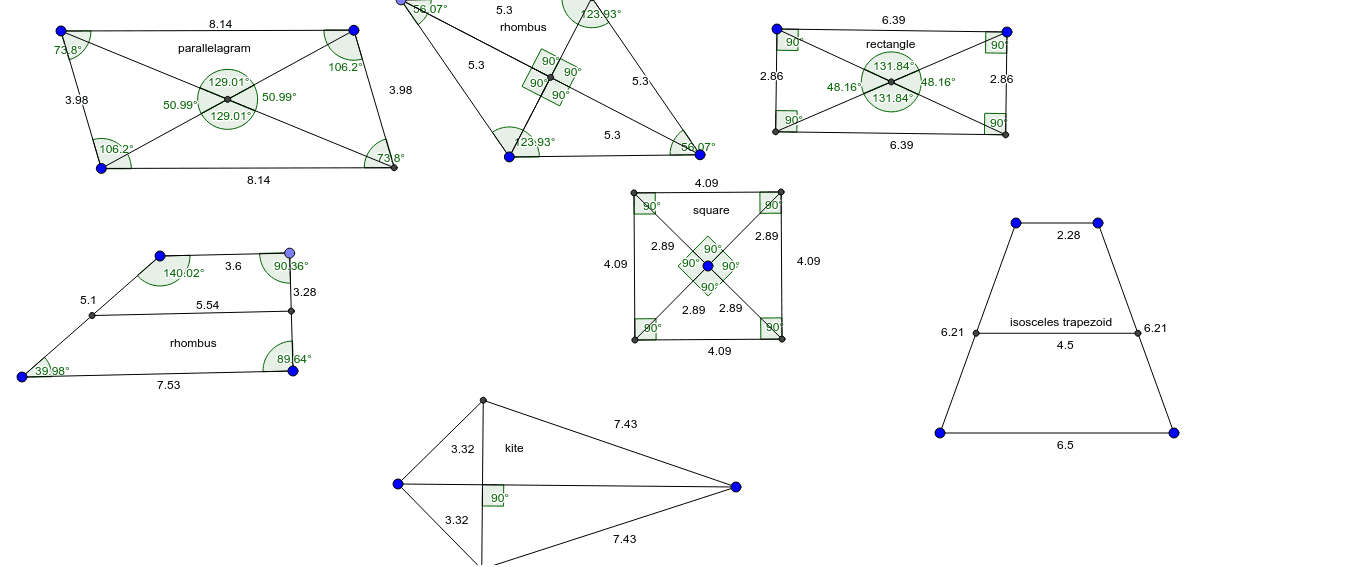
This example demonstrates the construction of quadrilaterals, kites, and trapezoids. Key mathematical concepts include polygons, angles, and geometric construction. Using GeoGebra commands such as Segment, Line, and Intersect, these shapes can be dynamically constructed. Suitable for middle school and above students or teachers.
GeoGebra Commands & Parameters
Segment(A, B) → aLine(C, a) → bSegment(A, C) → cLine(B, c) → dIntersect(b, d) → DSegment(C, D) → eSegment(D, B) → fAngle(C, A, B) → αAngle(A, B, D) → βAngle(B, D, C) → γAngle(D, C, A) → δSegment(C, B) → gSegment(D, A) → hIntersect(g, h) → ESegment(C, E) → iSegment(E, A) → jSegment(E, B) → kSegment(D, E) → lAngle(A, E, C) → εAngle(C, E, D) → ζAngle(D, E, B) → ηAngle(B, E, A) → θCircle(F, G) → pCircle(G, F) → qPoint(p) → HCircle(H, F) → rIntersect(q, r, 2) → ISegment(H, I) → mSegment(I, G) → nSegment(G, F) → sSegment(F, H) → tAngle(F, H, I) → ιAngle(H, I, G) → κAngle(I, G, F) → λAngle(G, F, H) → μSegment(F, I) → a_1Segment(G, H) → b_1Intersect(a_1, b_1) → JSegment(F, J) → c_1Segment(H, J) → d_1Segment(J, G) → e_1Segment(J, I) → f_1Segment(K, L) → g_1Segment(F, J) → h_1Segment(J, H) → i_1Segment(G, J) → j_1Segment(J, I) → k_1Angle(I, J, H) → νAngle(H, J, F) → ξAngle(F, J, G) → οAngle(G, J, I) → ρLine(M, g_1) → l_1OrthogonalLine(K, g_1) → m_1OrthogonalLine(L, l_1) → n_1Intersect(l_1, m_1) → NIntersect(n_1, l_1) → OSegment(K, N) → p_1Segment(N, O) → q_1Segment(L, O) → r_1Angle(N, K, L) → σAngle(K, L, O) → τAngle(L, O, N) → υAngle(O, N, K) → ϕSegment(N, L) → s_1Segment(O, K) → t_1Intersect(s_1, t_1) → PSegment(N, P) → a_2Segment(P, L) → b_2Segment(O, P) → c_2Segment(P, K) → d_2Angle(L, P, K) → χAngle(K, P, N) → ψAngle(N, P, O) → ωAngle(O, P, L) → α_1Circle(Q, R) → e_2Line(Q, T) → f_2Intersect(e_2, f_2) → V, WCircle(V, W) → g_2Circle(W, V) → h_2Intersect(g_2, h_2, 2) → ZLine(Q, Z) → i_2Intersect(g_2, h_2, 1) → A_1Intersect(e_2, i_2) → B_1, C_1Segment(W, B_1) → j_2Segment(B_1, V) → k_2Segment(V, C_1) → l_2Segment(C_1, W) → m_2Segment(B_1, Q) → n_2Segment(Q, C_1) → p_2Segment(Q, W) → q_2Segment(Q, V) → r_2Angle(B_1, W, C_1) → β_1Angle(W, C_1, V) → γ_1Angle(C_1, V, B_1) → δ_1Angle(V, B_1, W) → ε_1Angle(B_1, Q, V) → ζ_1Angle(V, Q, C_1) → η_1Angle(C_1, Q, W) → θ_1Angle(W, Q, B_1) → ι_1Segment(D_1, E_1) → s_2Line(F_1, s_2) → t_2Segment(F_1, D_1) → a_3Point(t_2) → G_1Segment(F_1, G_1) → b_3Segment(G_1, E_1) → c_3Angle(E_1, D_1, F_1) → κ_1Angle(D_1, F_1, G_1) → λ_1Angle(F_1, G_1, E_1) → μ_1Angle(G_1, E_1, D_1) → ν_1Segment(H_1, I_1) → d_3Point(d_3) → J_1OrthogonalLine(J_1, d_3) → e_3Circle(J_1, H_1) → f_3Intersect(f_3, e_3) → K_1, L_1Segment(H_1, L_1) → g_3Segment(H_1, K_1) → h_3Segment(K_1, I_1) → i_3Segment(I_1, L_1) → j_3Segment(L_1, K_1) → k_3Angle(k_3, d_3) → ξ_1Distance(a, r_2) → oLine(M_1, b_3) → l_3Intersect(l_3, a_3) → N_1Intersect(l_3, c_3) → O_1Segment(N_1, O_1) → m_3Segment(P_1, Q_1) → n_3LineBisector(n_3) → p_3Mirror(R_1, p_3) → S_1Segment(R_1, P_1) → q_3Segment(R_1, S_1) → r_3Segment(S_1, Q_1) → s_3Point(q_3) → T_1Line(T_1, r_3) → t_3Intersect(t_3, s_3) → U_1Segment(T_1, U_1) → a_4Intersect(q_3, a_4) → V_1
AI Drawing Prompt Reference
Draw a quadrilateral first, then construct a kite and a trapezoid. Start by drawing line segments AB, BC, CD, and DA. Next, use point D to construct line segment DE. Draw line segments CE and EB. Measure angles α, β, γ, and δ to ensure they fit the properties of a quadrilateral. Finally, use point E to draw line segments EF and EG to form a kite, and use points F and G to draw line segments FH and GH to form a trapezoid.
The prompt above was compiled from the original drawing commands and is for reference only.