
Quadrilateral Inscribed in a Circle Investigation
Loading the math board and drawing, please wait…
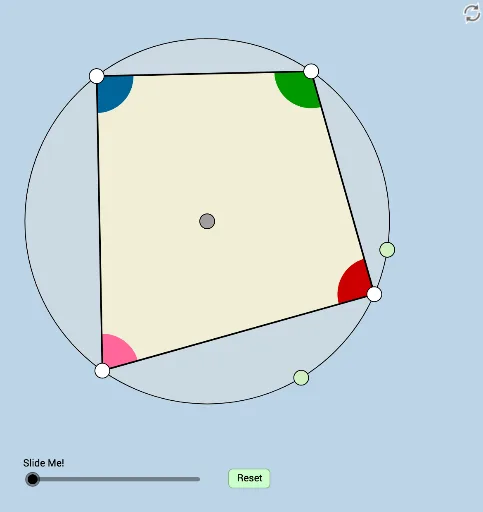
This applet dynamically demonstrates a key property of cyclic quadrilaterals: opposite angles are supplementary (sum to 180°). It serves as an immediate corollary of the inscribed angle theorem, allowing students to drag vertices on the circle and observe that the angle measures always satisfy the supplementary relationship. Core mathematical concepts include inscribed angles, central angles, cyclic quadrilaterals, supplementary angles, and rotational symmetry. The construction uses GeoGebra commands such as Circle, Point, Rotate, Segment, Angle, CircleArc, CircleSector, Dilate, Translate, and Ray, along with numerous auxiliary objects (A, B, c, C, C', d, D, e, E, f, F, g, G, b, h, a, i, k, p, q, r, H, I, J, K, L, M, N, O, s, t, c_1, d_1, e_1, j, E', u, f_1, g_1, J') to support interactive exploration. Suitable for middle or high school geometry classes, this applet helps students discover the theorem through hands-on manipulation, fostering geometric intuition and deductive reasoning.
GeoGebra Commands & Parameters
Circle(A, B) → cPoint(c) → CRotate(C, 2°, A) → C'CircleArc(A, C', C) → dPoint(d) → DCircleArc(A, D, C) → ePoint(e) → ECircleArc(A, E, C) → fPoint(f) → FCircleArc(A, F, C) → gPoint(g) → GSegment(D, E) → bSegment(E, F) → hSegment(D, G) → aSegment(G, F) → iCircle(F, (0.2 * Distance[A, B])) → kCircle(E, (0.2 * Distance[A, B])) → pCircle(G, (0.2 * Distance[A, B])) → qCircle(D, (0.2 * Distance[A, B])) → rIntersect(k, i, 1) → HIntersect(k, h, 1) → IIntersect(p, h, 1) → JIntersect(p, b, 1) → KIntersect(r, a, 1) → LIntersect(r, b, 1) → MIntersect(q, a, 1) → NIntersect(q, i, 1) → OCircleSector(G, N, O) → sCircleSector(F, H, I) → tCircleSector(E, J, K) → c_1CircleSector(D, M, L) → d_1Circle(A, B) → e_1Dilate(E, If[0 < j ≤ 1, 1 - j, 0], G) → E'Vector(E, E') → uTranslate(c_1, u) → f_1CircleArc(E, J, K) → g_1Translate(J, u) → J'Angle(O, G, J') → αRotate(f_1, If[1 < j ≤ 2, ((-(j - 1)) * α), (-α)], G) → h_1Ray(D, G) → lPoint(l) → PRay(G, P) → mDilate(F, If[2 < j ≤ 3, 3 - j, 0], D) → F'Vector(F, F') → vRay(G, D) → nPoint(n) → QRay(D, Q) → a_1Translate(t, v) → t'CircleArc(F, H, I) → k_1Translate(I, v) → I'Angle(I', D, M) → βRotate(t', If[3 < j ≤ 4, ((j - 3) * β), β], D) → t''Polygon(G, D, E, F) → poly1, g_2, d_2, e_2, f_2
AI Drawing Prompt Reference
Draw a circle and mark points C, D, E, F, G on its circumference in order, connecting them to form a pentagon. Draw smaller circles centered at each pair of adjacent points, marking their intersections as H, I, J, K, L, M, N, O. Create sectors between these points to illustrate the internal angle relationships of the pentagon. Add a slider to control the vertices' positions and observe the changes in angles and symmetry, demonstrating the supplementary property of opposite angles.
The prompt above was compiled from the original drawing commands and is for reference only.